New

The WPforOps Manifesto. Why WordPress can run more of your organisation than you think.

Read it
  1. Home
  2. Plugins
  3. WPFlat Tasks
Free and open source · by WPFlat

WPFlat Tasks: projects, phases and tasks, on your own WordPress.

Break every project into phases and tasks, see what is due and who has it, and give each person a "my tasks" view. A free, open-source module for WPFlat Core.

Version 0.3.0 · GPL-2.0-or-later · WordPress 6.0+ · PHP 7.4+ · needs WPFlat Core 0.6.0+

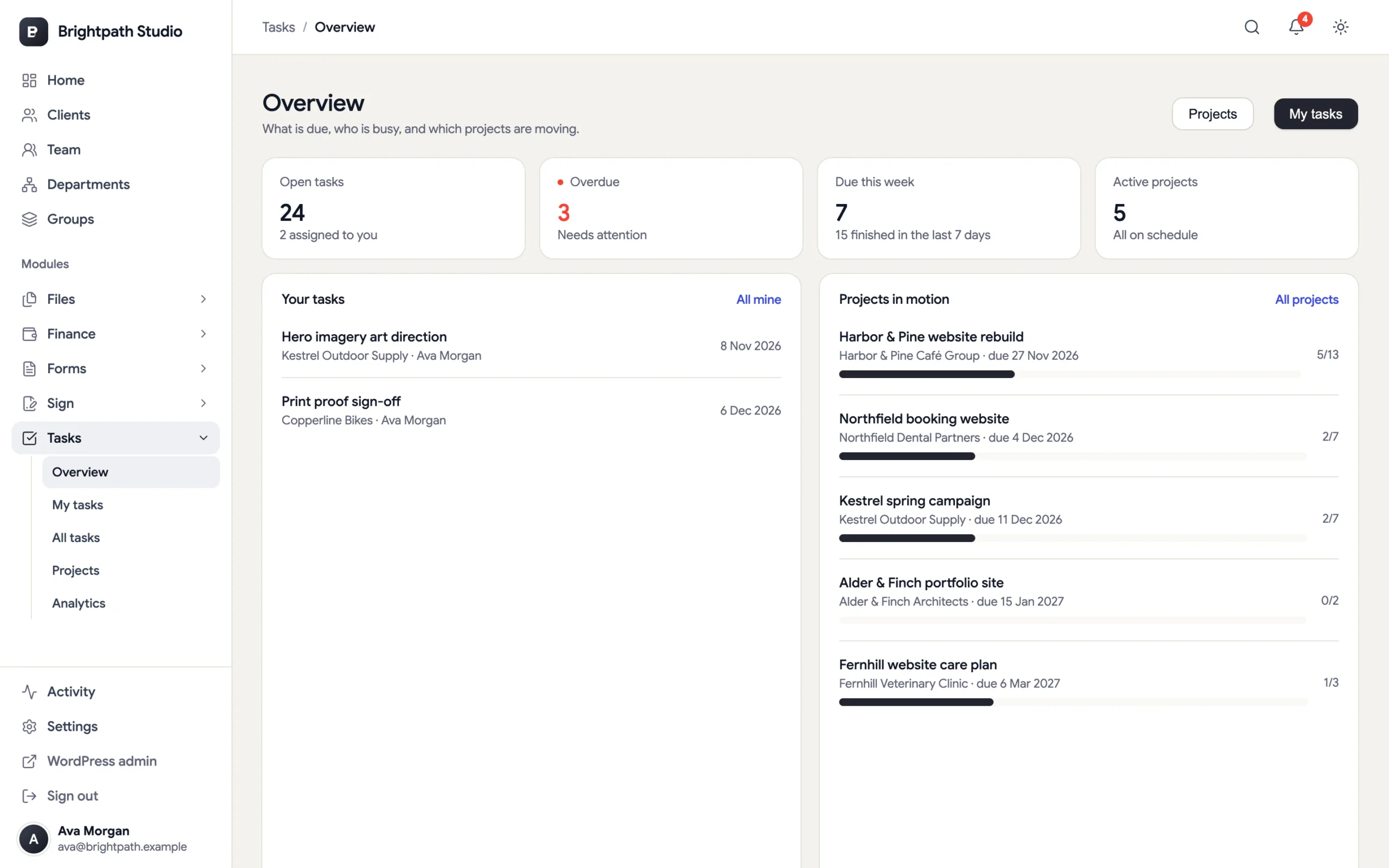
Tasks overview: The Tasks overview: open, overdue and due-this-week counts, the signed-in person's own tasks and the projects in motion with progress bars.

WPFlat Tasks needs WPFlat Core.

WPFlat Tasks is a module for WPFlat Core, the free, open-source plugin that holds your clients, team, client portal and settings. Install WPFlat Core first, then WPFlat Tasks. Core is what gives WPFlat Tasks its people, its login and its look; the module adds the projects and tasks.

See what is due, and how the work is moving.

Projects, phases, tasks

Break a project into phases and each phase into tasks, so the shape of the work is clear from the start.

A "my tasks" view

Everyone sees their own list: what is theirs, what is due and what is next.

Analytics on the work

Task analytics show how work is moving across projects and people, without a separate reporting tool.

Projects your whole team can follow.

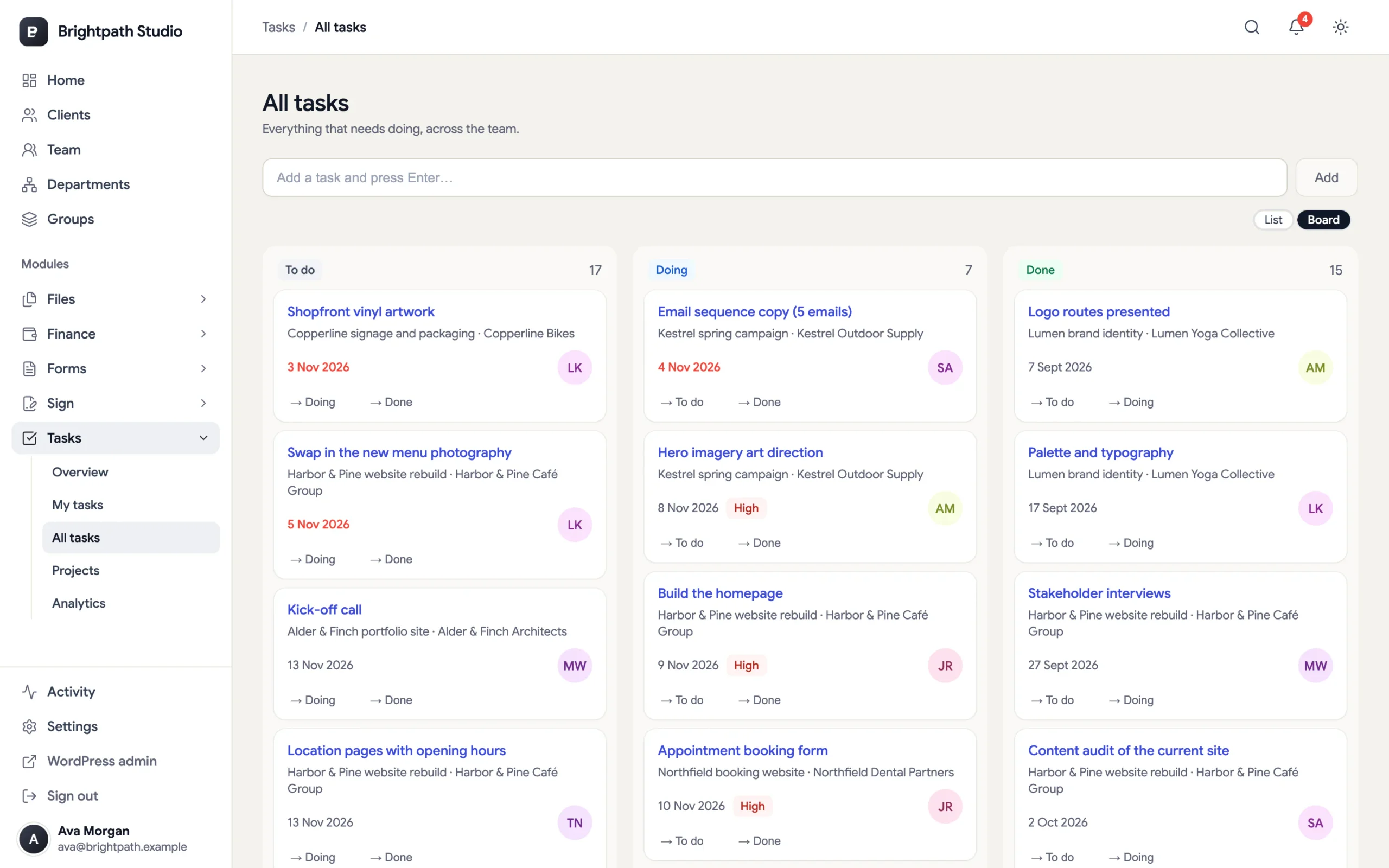
Every task, in three columns

To do, Doing and Done, with priority, due date and assignee on each card. Cards move between columns with a click.

Task board: All tasks as a board with To do, Doing and Done columns, with priority, due date and assignee on each card.

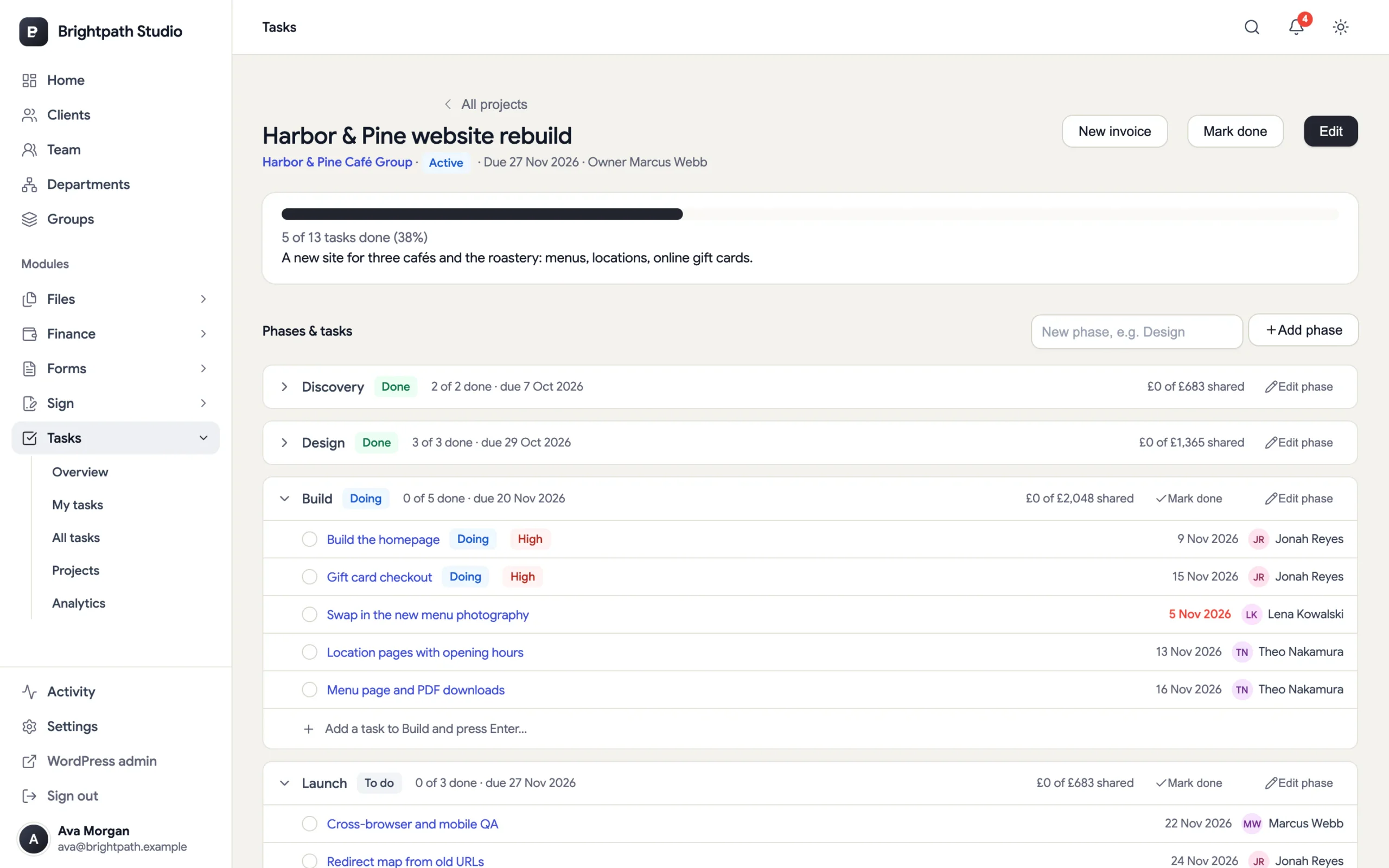
Break a project into phases

Discovery, Design, Build, Launch, or your own phases, each with its tasks, owners, due dates and progress.

Project with phases: One client project split into phases (Discovery, Design, Build, Launch) with its tasks, owners, due dates and overall progress.

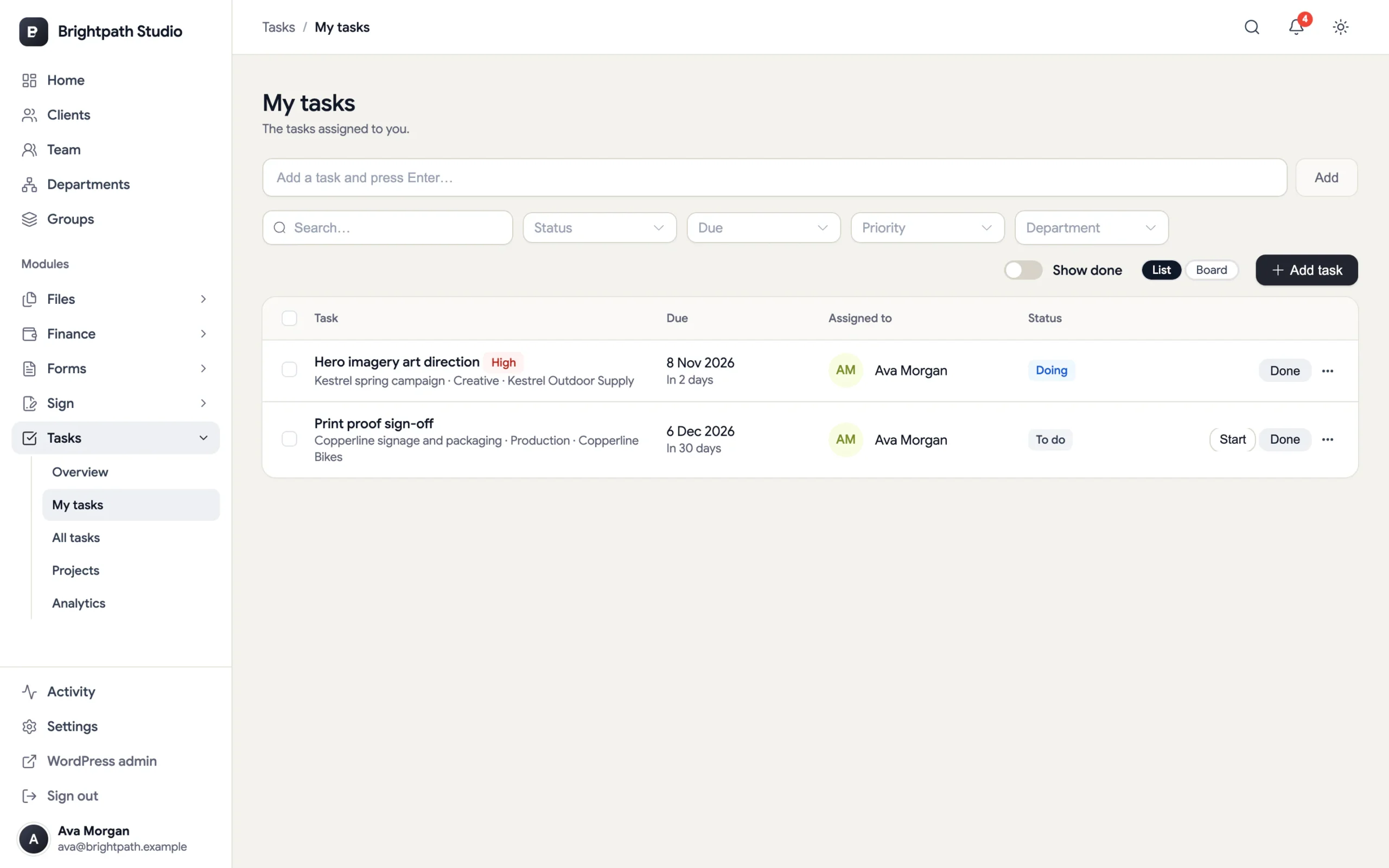
A personal list for everyone

Each person sees only what is assigned to them, with due dates and one-click Done.

My tasks: My tasks: only what is assigned to the signed-in team member, with due dates and one-click Done.

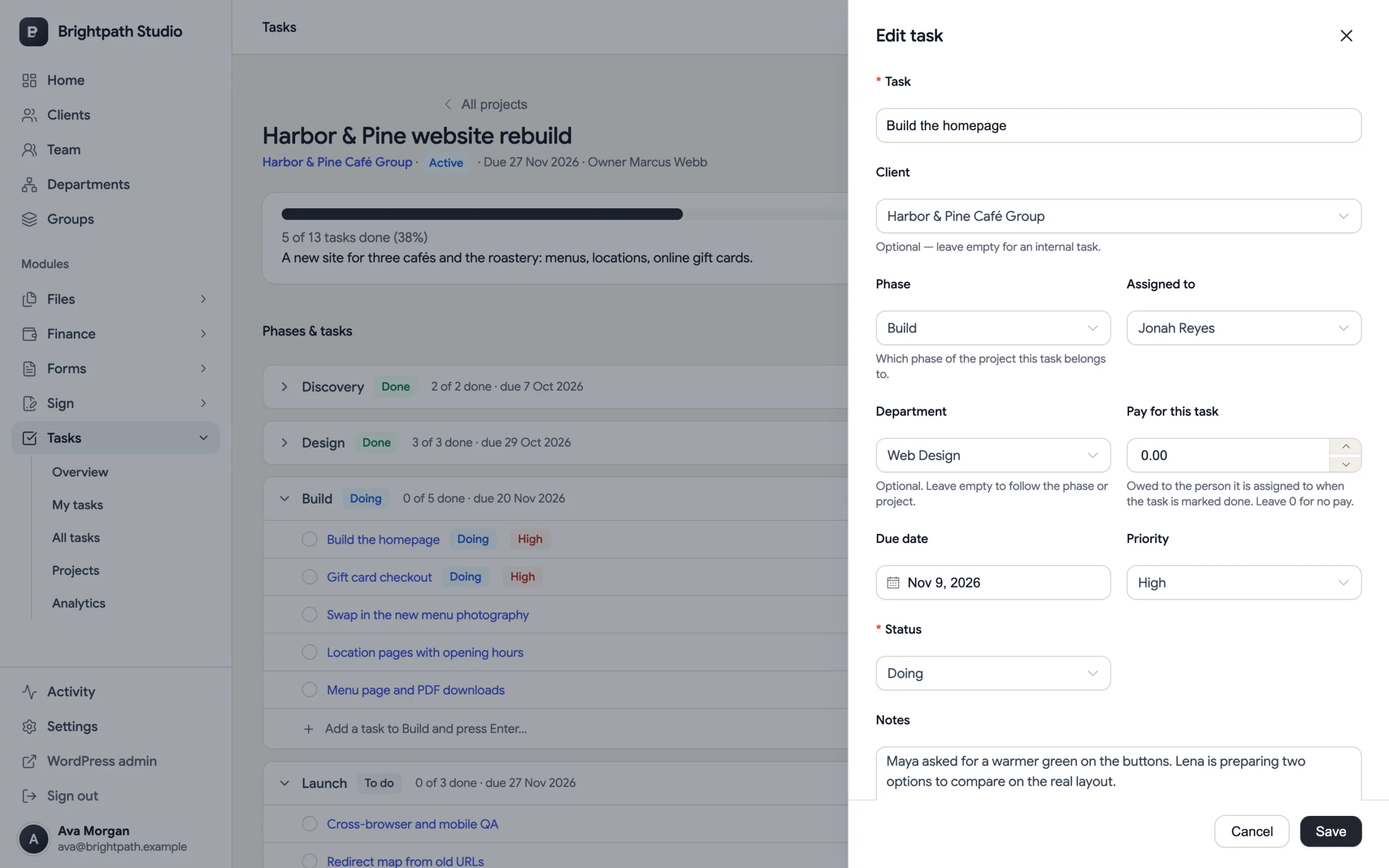
Notes, owner and due date in one drawer

Open a task to set its status, priority, due date, assignee and client, and keep its notes.

Task detail: A task opened from its project: notes and checklist, status, priority, due date, assignee and client.

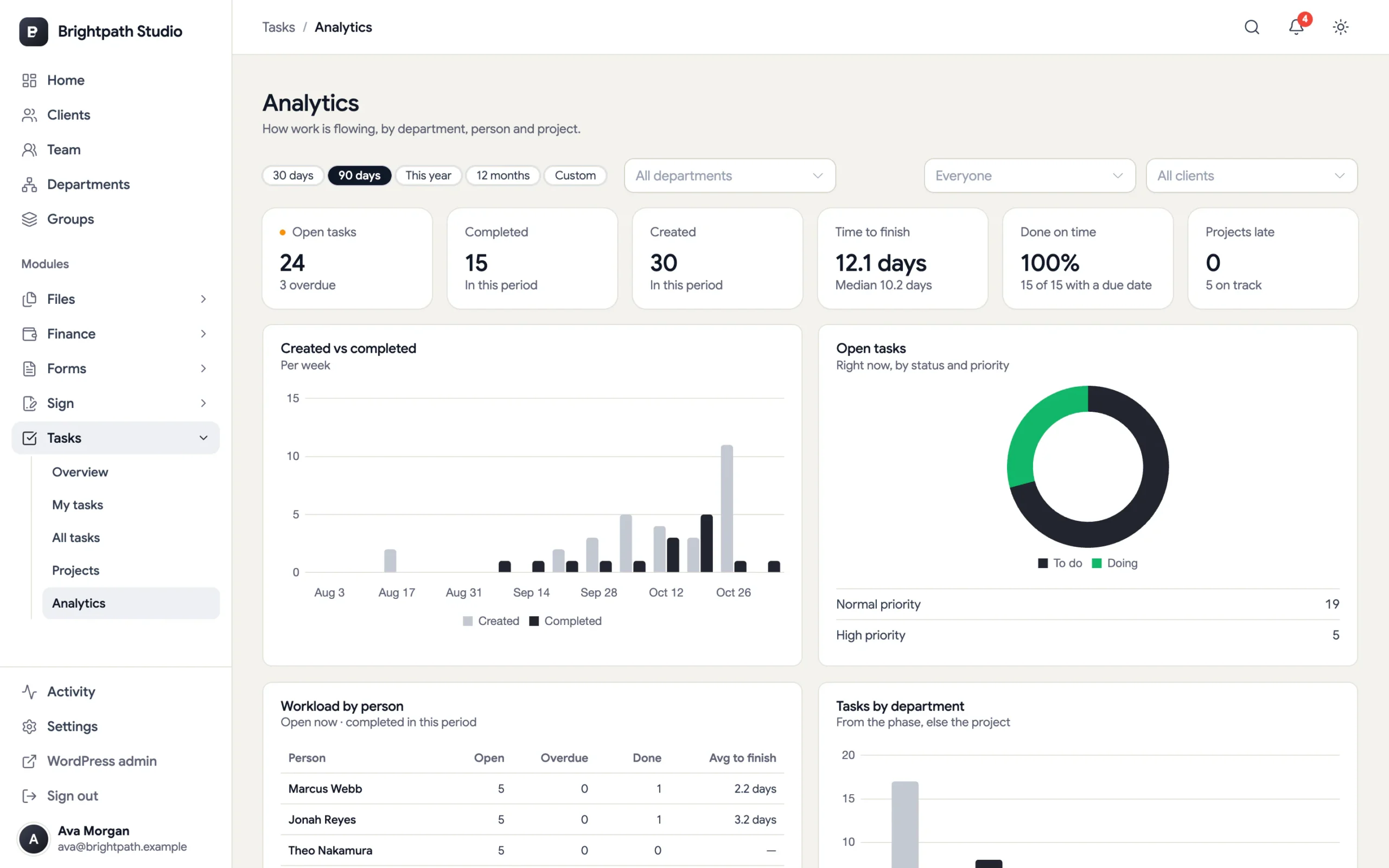
See how the work is moving

Created versus completed per week, time to finish, on-time rate, workload per person and tasks by department, over a range you pick.

Task analytics: Analytics for the last 90 days: created versus completed per week, time to finish, on-time rate, workload per person and tasks by department.

The full feature list.

Projects and phases

  • Projects with client, owner, department, dates and status
  • Phases inside a project, each with its own status and dates
  • Progress for the project and for each phase
  • Overdue markers when a project is past due

Tasks

  • Title, notes, status, priority, due date, assignee, client, project and phase
  • List view with filters for status, due date, priority and department, plus search
  • Board view with To do, Doing and Done
  • Quick-add: type a task and press Enter
  • “My tasks” for each signed-in person

Insight and notifications

  • An overview of open, overdue and due-this-week work
  • Analytics over 30 or 90 days, this year, 12 months or a custom range
  • Notifications when a task is assigned, completed, due soon or late
  • Optional client notifications when a project starts, finishes or is put on hold

Fits with the rest of WPFlat

  • Projects and tasks show on client, team and department pages and in search
  • A Projects page in the client portal that never shows costs or internal notes
  • With WPFlat Finance: project prices, phase budgets and pay per phase or task

What it does not do

  • No time tracking, timesheets or estimates.
  • No Gantt chart, calendar view or task dependencies.
  • No sub-tasks or recurring tasks, and notes are a plain text field.
  • Board cards move with buttons, not drag and drop.

Install it yourself, or let us do it.

Option 1 · Free

Download from GitHub and install it

No sign-up, no licence key and no limits. It runs on your own WordPress site.

  1. Install and activate WPFlat Core first (download).
  2. Download wpflattasks.zip from GitHub with the button below.
  3. In WordPress go to Plugins, Add New, Upload Plugin, choose the zip and activate it.
  4. Open WPFlat Tasks in the WPFlat app and follow the first-run steps.
Option 2 · Hosted by WPFlat

Let WPFlat install and configure it

Would rather not run it yourself? Tell us what your team needs and we will set it all up and look after it.

  • Installing WPFlat Core and WPFlat Tasks on your WordPress site, or on a site we host for you
  • Setting up your company, team, branding and the words you use
  • Bringing in your existing data where we can
  • A walkthrough for your team
  • Hosting, updates, backups and support, if you want them

Before you download.

Can clients see my tasks?

Only what you allow. The portal Projects page can show projects, optionally their tasks and who is doing them, and never costs or internal notes.

Why does “My tasks” show nothing for me?

It lists tasks assigned to the team member linked to your login. Link your team record to your login first.

Do I need WPFlat Finance?

No. Finance only adds money fields such as a project price, phase budgets and task pay.

Can I use it for one-person work?

Yes. Tasks need no assignee and projects need no phases.

Can WPFlat set up WPFlat Tasks for me?

Yes. We can install it, configure it for your team, bring in your data, host it and look after it. Ask on the contact page and tell us what you need.

Is WPFlat Tasks really free?

Yes. It is open source under the GPL, with no paid tier, licence key or user limit. You pay only for your own WordPress hosting and domain, or for our help if you ask for it.

Get the work out of chat threads.

Download WPFlat Tasks, add it next to WPFlat Core and start your first project.