




New

The WPforOps Manifesto. Why WordPress can run more of your organisation than you think.

Read it
  1. Home
  2. Plugins
  3. WPFlat Finance
Free and open source · by WPFlat

WPFlat Finance: invoices, expenses, payroll and profit for WordPress.

The whole money side of operations in one free, open-source module: what you sell, what you bill, what comes in and what goes out, with public invoice and payslip pages. A module for WPFlat Core.

Version 0.7.3 · GPL-2.0-or-later · WordPress 6.0+ · PHP 7.4+ · needs WPFlat Core 0.6.0+

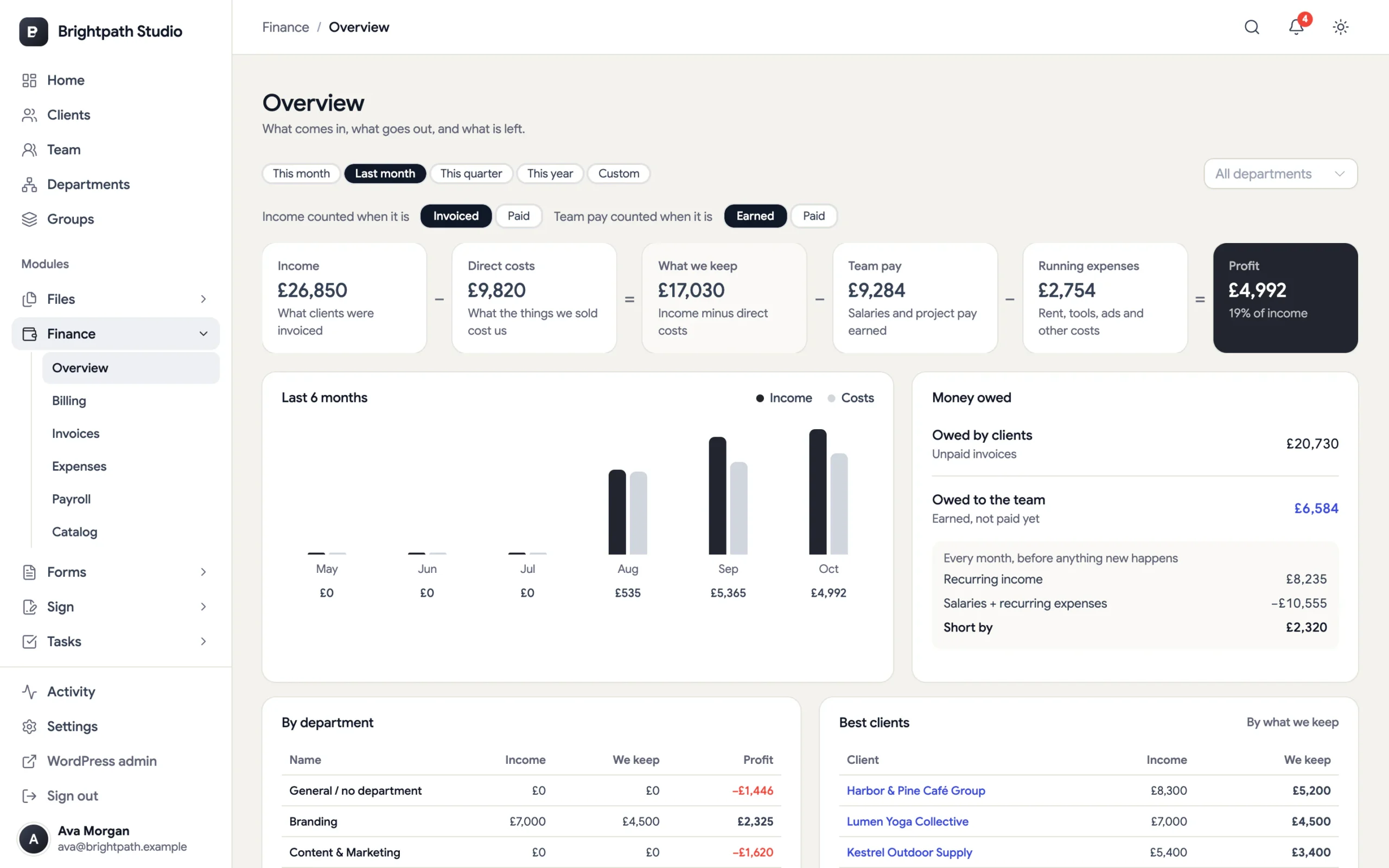
Money overview: The Finance overview for last month: income, direct costs, what the studio keeps, team pay, running expenses and profit, with a six-month chart and what is owed.

WPFlat Finance needs WPFlat Core.

WPFlat Finance is a module for WPFlat Core, the free, open-source plugin that holds your clients, team, client portal and settings. Install WPFlat Core first, then WPFlat Finance. Core is what gives WPFlat Finance its people, its login and its look; the module adds the money side of the business.

From the first invoice to profit, in one place.

Catalog, subscriptions and renewals

Keep the services and products you sell, with prices, and let subscriptions and renewals turn into invoices.

Invoices and payments

Send invoices with public invoice pages, record payments and keep every number and link stable.

Expenses, payroll and profit

Record what goes out, pay your team with payslips, and see your profit.

The whole money picture, on one screen.

Every invoice and what is still owed

Paid, partly paid, due, sent, overdue and draft invoices with amounts and balances, for every client.
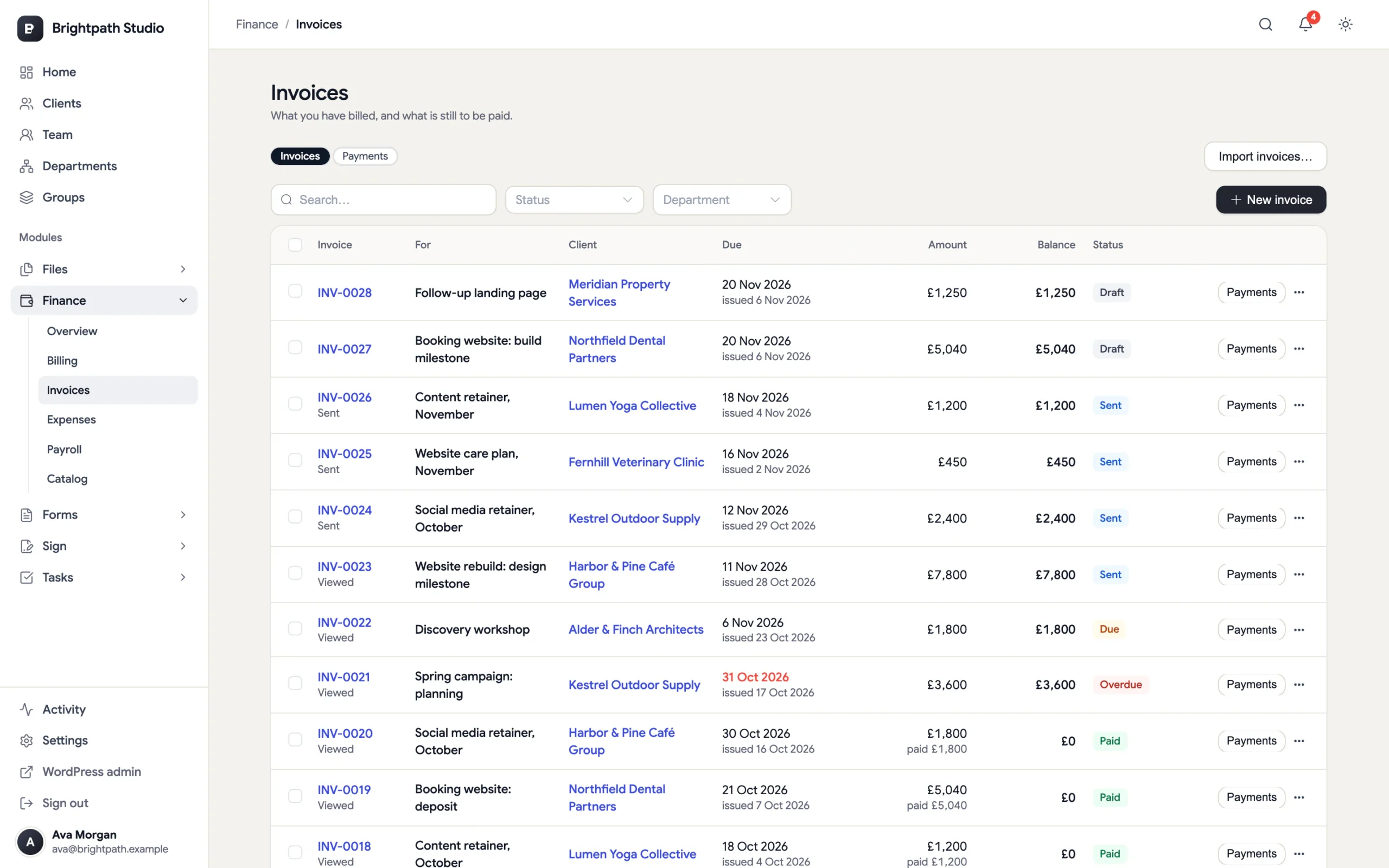
Invoices: The invoice list for eight fictional clients with paid, partly paid, due, sent, overdue and draft invoices, amounts and balances.

Line items, tax and a private client link

Fixed-price and quantity lines, discount, VAT, instalments, payments and the balance due, plus a branded page your client opens from a link.
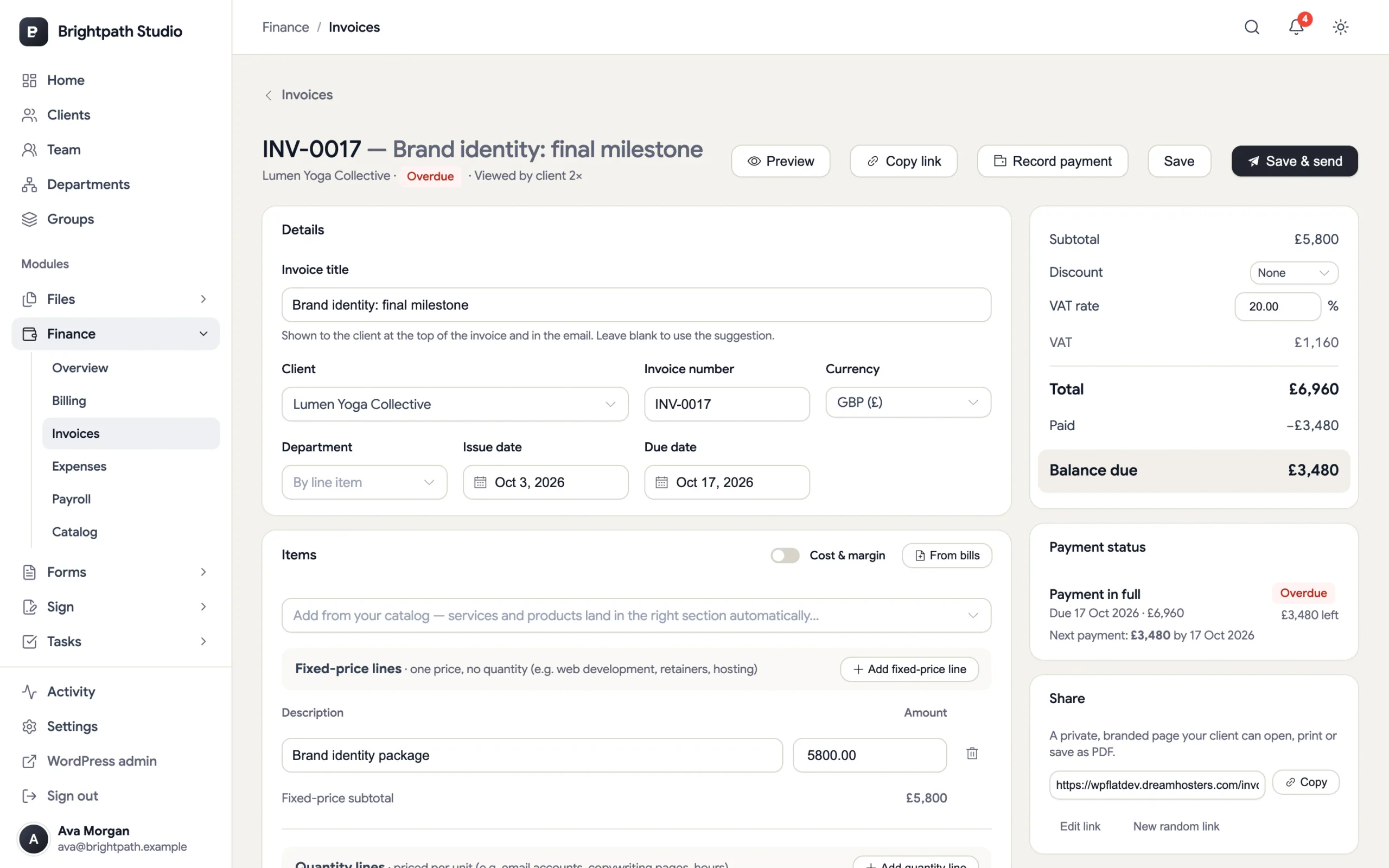
Invoice editor: An overdue, part-paid invoice in the editor: line items with VAT, balance due, payment status and the private client link.

A monthly pay run for your team

Each person’s salary, extras such as a bonus or reimbursement, what is owed and who has been paid, with a printable payslip.
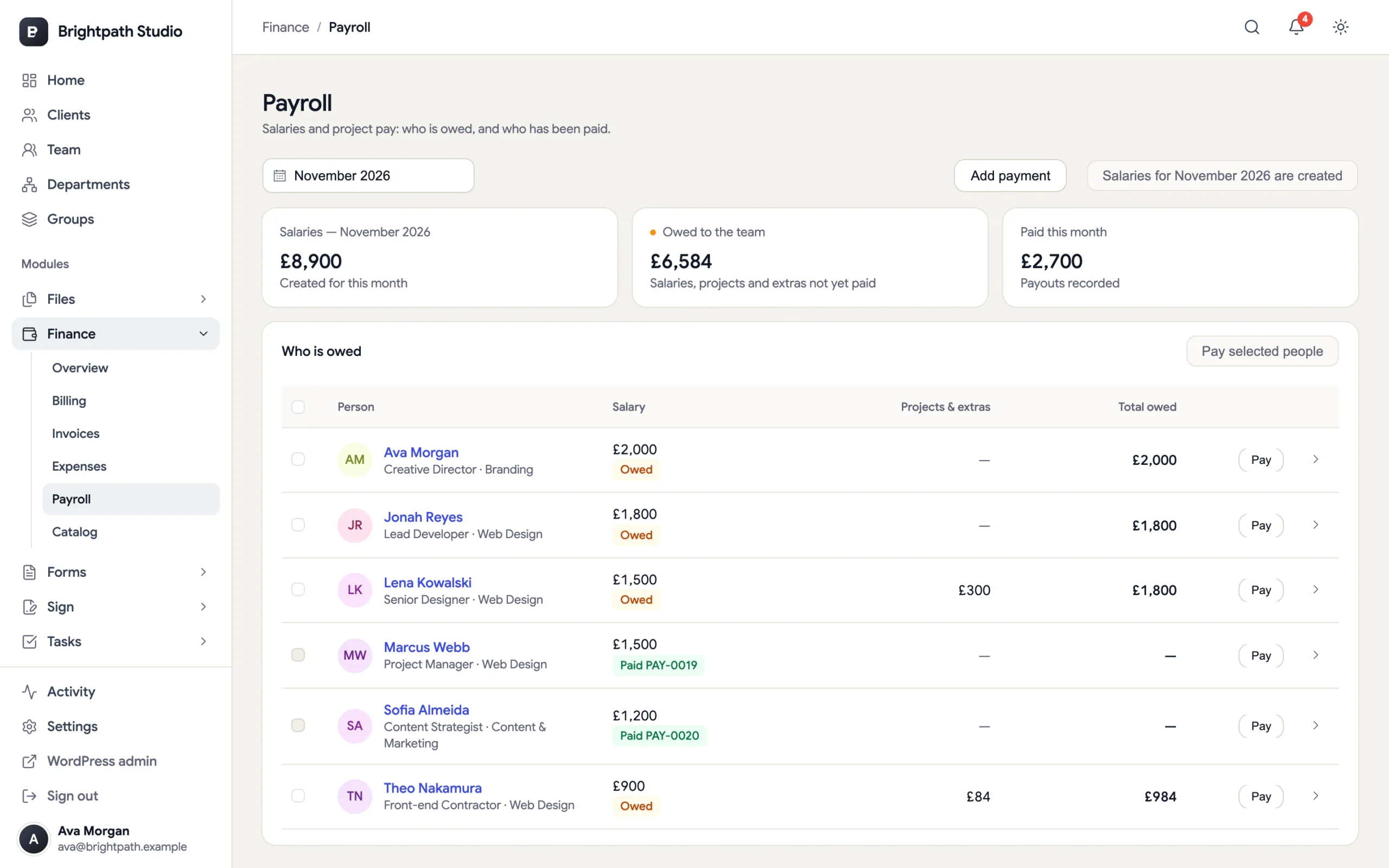
Payroll: The monthly pay run: each person's salary, extras such as a bonus or reimbursement, what is owed and who has already been paid.

Know where the money goes

Expenses by category and department, recurring costs that post themselves, and this month, last month and monthly totals.
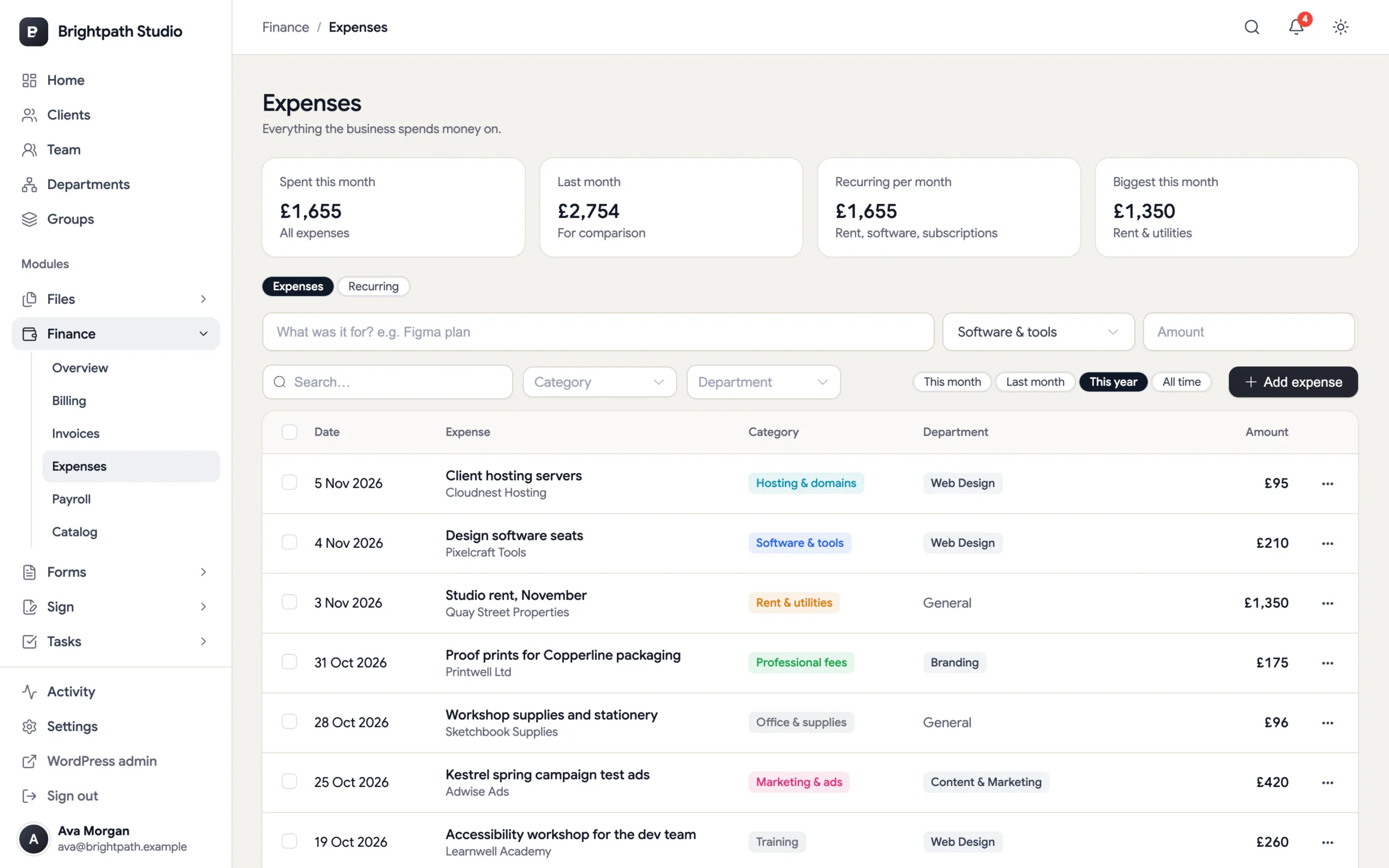
Expenses: Expenses over the year with category, department and amount, plus this month, last month and recurring totals.

Retainers and renewals, ready to invoice

Subscriptions, retainers and one-off charges grouped by bill date. Tick what belongs to one client and create a single invoice.
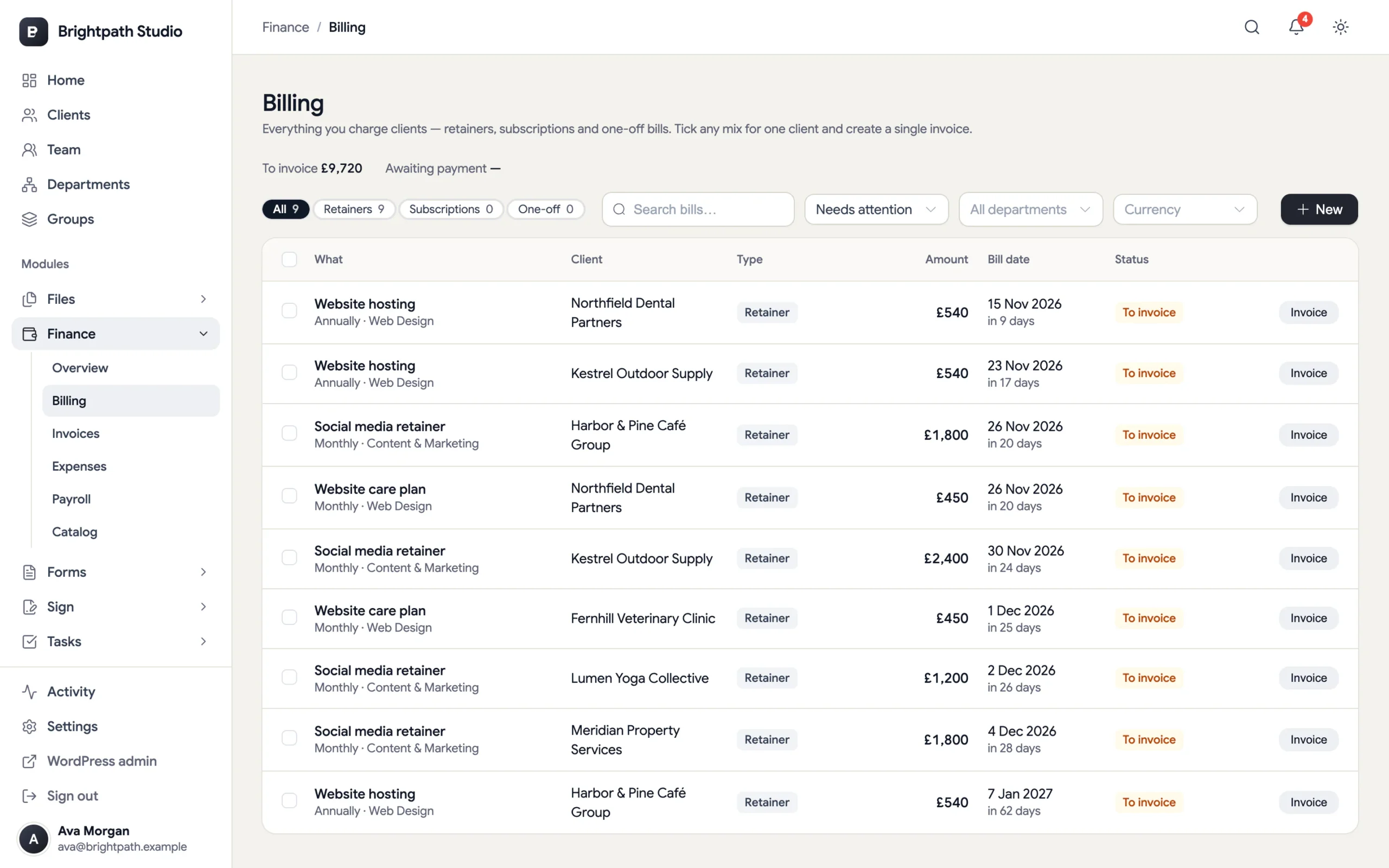
Billing queue: The Billing screen: retainers, subscriptions and renewals that are ready to invoice, grouped by type with bill dates.

The full feature list.

Invoices and payments

  • Everything in WPFlat Invoice
  • Fixed and quantity lines, discount, tax and instalments
  • Part payments, and statuses that follow payments and due dates
  • A public invoice page with Print / PDF and “How to pay”
  • Optional payment reminders and a thank-you email

Catalog and recurring billing

  • A catalog of services and products with price and cost
  • Subscriptions with monthly, quarterly, yearly or custom cycles
  • One-off charges and a Billing screen to turn ready items into an invoice
  • Each invoice line keeps a cost snapshot, so staff see the margin

Expenses and payroll

  • Expenses by date, vendor, category, department and client
  • Recurring expense templates that post themselves
  • Monthly salaries and a pay-run screen
  • Bonuses, reimbursements, deductions and adjustments
  • Printable payslips

Profit and reports

  • Income, direct costs, what you keep, team pay, running expenses and profit
  • This month, last month, quarter, year or a custom range
  • Six-month chart, money owed by clients and to the team
  • Profit by department and best clients
  • CSV export of income, expenses and team pay

What it does not do

  • It is not a full accounting system: no double-entry ledger, bank feeds or tax returns, and no payroll tax calculation.
  • No online card payments. Clients pay by the bank details or payment link you give them, and you record the payment.
  • It cannot run at the same time as WPFlat Invoice.
  • Early in a month, “This month” profit can look negative because whole-month salaries count against few invoices. Use “Last month” for a fair picture.

Install it yourself, or let us do it.

Option 1 · Free

Download from GitHub and install it

No sign-up, no licence key and no limits. It runs on your own WordPress site.

  1. Install and activate WPFlat Core first (download).
  2. Download wpflatfinance.zip from GitHub with the button below.
  3. In WordPress go to Plugins, Add New, Upload Plugin, choose the zip and activate it.
  4. Open WPFlat Finance in the WPFlat app and follow the first-run steps.
Option 2 · Hosted by WPFlat

Let WPFlat install and configure it

Would rather not run it yourself? Tell us what your team needs and we will set it all up and look after it.

  • Installing WPFlat Core and WPFlat Finance on your WordPress site, or on a site we host for you
  • Setting up your company, team, branding and the words you use
  • Bringing in your existing data where we can
  • A walkthrough for your team
  • Hosting, updates, backups and support, if you want them

Before you download.

Do I need WPFlat Invoice as well?

No. Finance already includes everything Invoice does. Activating Finance on a site that used Invoice copies its invoices, payments, catalog and settings, with the same numbers and public links, and switches Invoice off.

Does it work without WPFlat Tasks?

Yes. Tasks only adds project prices, phase budgets and pay per phase or task.

Does it run payroll?

It records salaries, extras and payouts and prints a payslip. It does not calculate tax or submit anything to a tax authority.

Can I see profit per client or department?

Yes. The overview lists profit by department and your best clients by what you keep.

Can WPFlat set up WPFlat Finance for me?

Yes. We can install it, configure it for your team, bring in your data, host it and look after it. Ask on the contact page and tell us what you need.

Is WPFlat Finance really free?

Yes. It is open source under the GPL, with no paid tier, licence key or user limit. You pay only for your own WordPress hosting and domain, or for our help if you ask for it.

See the whole money picture.

Download WPFlat Finance, add it next to WPFlat Core and send your first invoice.