


New

The WPforOps Manifesto. Why WordPress can run more of your organisation than you think.

Read it
  1. Home
  2. Plugins
  3. WPFlat Core
Free and open source · by WPFlat

WPFlat Core: your clients, team and client portal inside WordPress.

The free, open-source foundation of the WPFlat suite. Keep clients, contacts, team and messages in one app on your own WordPress site, give clients a portal to log in to, and add modules for projects, invoices, contracts, files and forms when you need them.

Version 0.8.4 · GPL-2.0-or-later · WordPress 6.0+ · PHP 7.4+

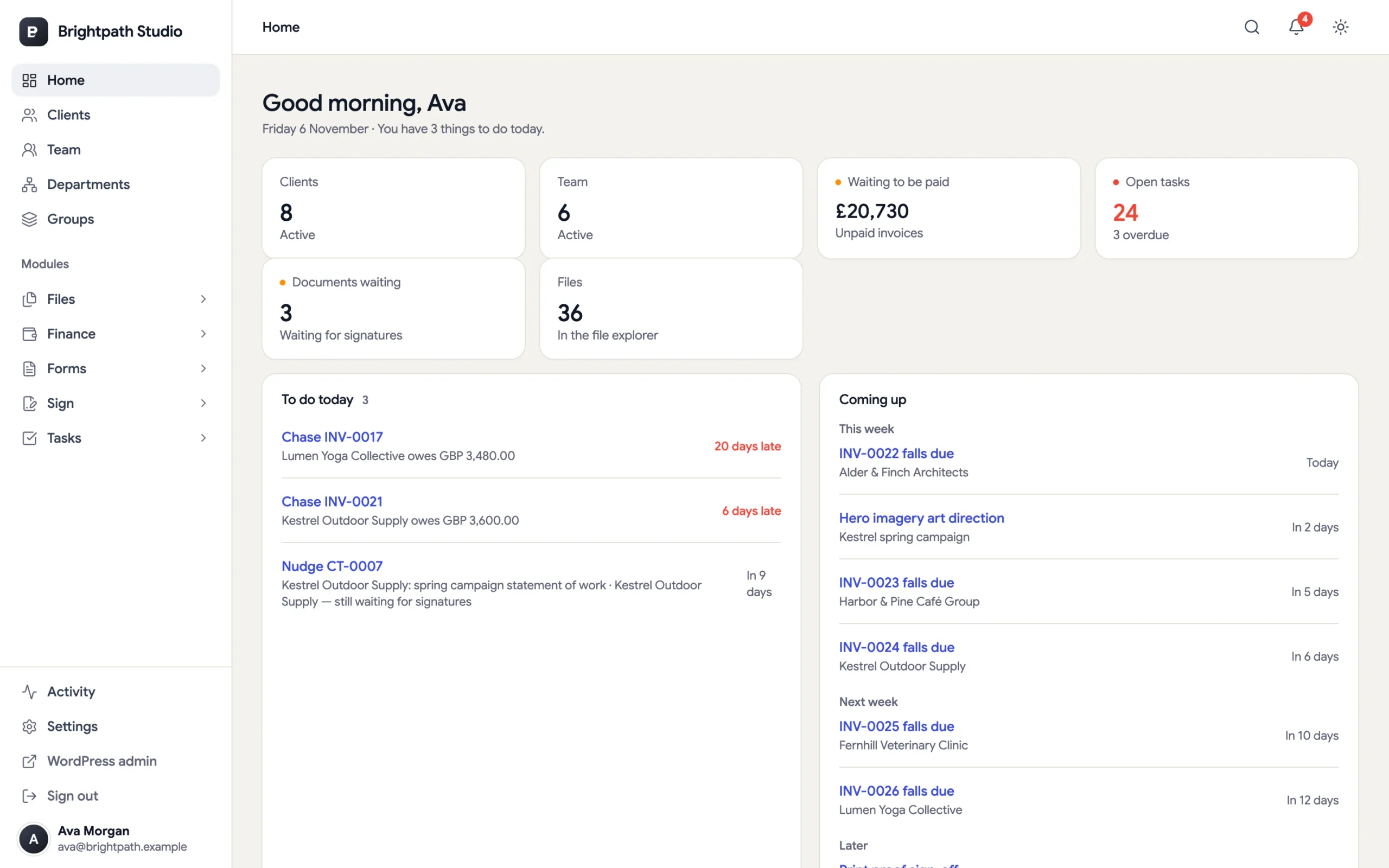
Home dashboard: The Home screen: client and team counts, unpaid invoices, open tasks, documents waiting for signatures, files, what is due today and what is coming up.

The foundation of every WPFlat plugin.

WPFlat Core holds the clients, team, portal and settings that the other WPFlat plugins plug into. Install it first, then add only the modules you need: Tasks, Invoice, Finance, Sign, Files and Forms. Each module needs only Core, never another module.

One place for the people you work with.

Clients, contacts and team together

Clients and contacts, client groups, your team, departments, groups and roles all live in one app inside WordPress, on your own data.

A portal they log in to

Clients get their own login, see what you share with them and message you from the portal, with notifications on both sides.

Add modules as you need them

Core is the module registry the other WPFlat plugins plug into. Add tasks, invoices, contracts, files or forms later without moving anything.

The app your team and your clients use.

Every client in one list

Clients with a type, status, departments and groups, and the contacts behind each one. The type and status lists are yours to edit.
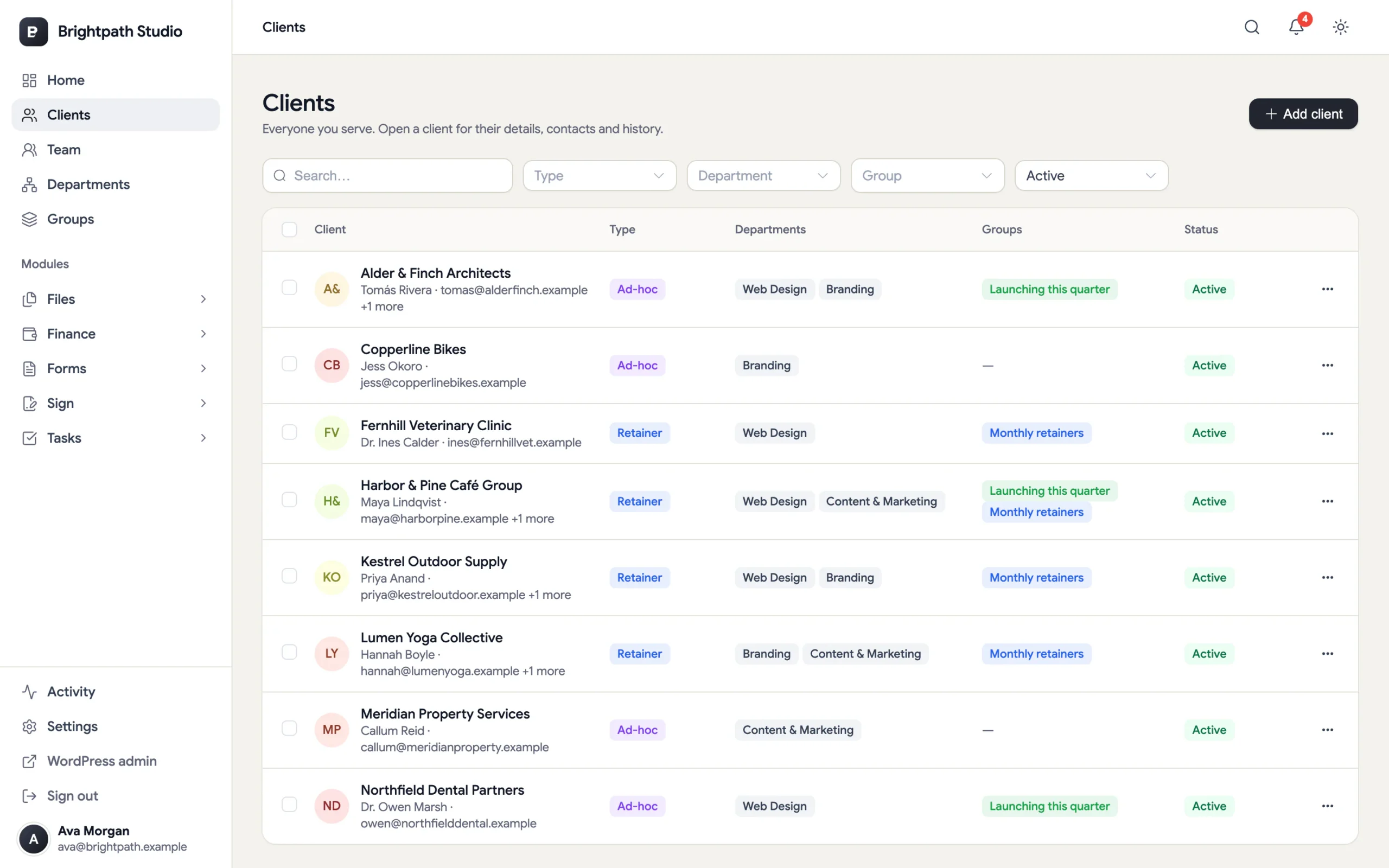
Clients: The client list with status, type, departments and groups for eight fictional clients.

Everything about a client, on one page

The profile pulls together what the installed modules know: billing, tasks, documents, forms, files and messages, plus a history of changes.
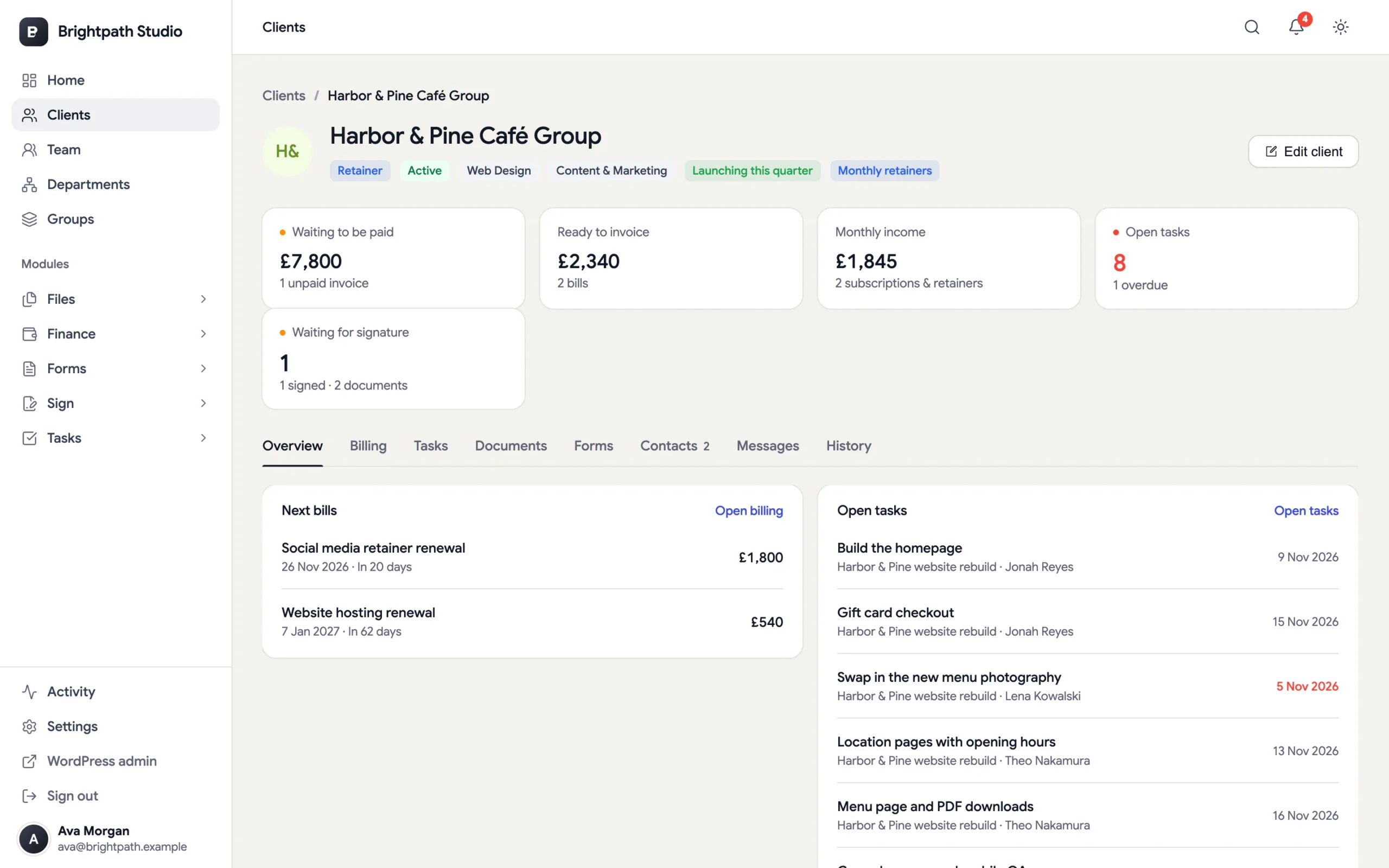
Client profile: One client's profile pulling together billing, tasks, documents, forms, contacts and messages from the installed modules.

A portal your clients log in to

Each client contact signs in and sees only their own organisation: projects, invoices, documents, files and messages. You choose which pages and sections are shown.
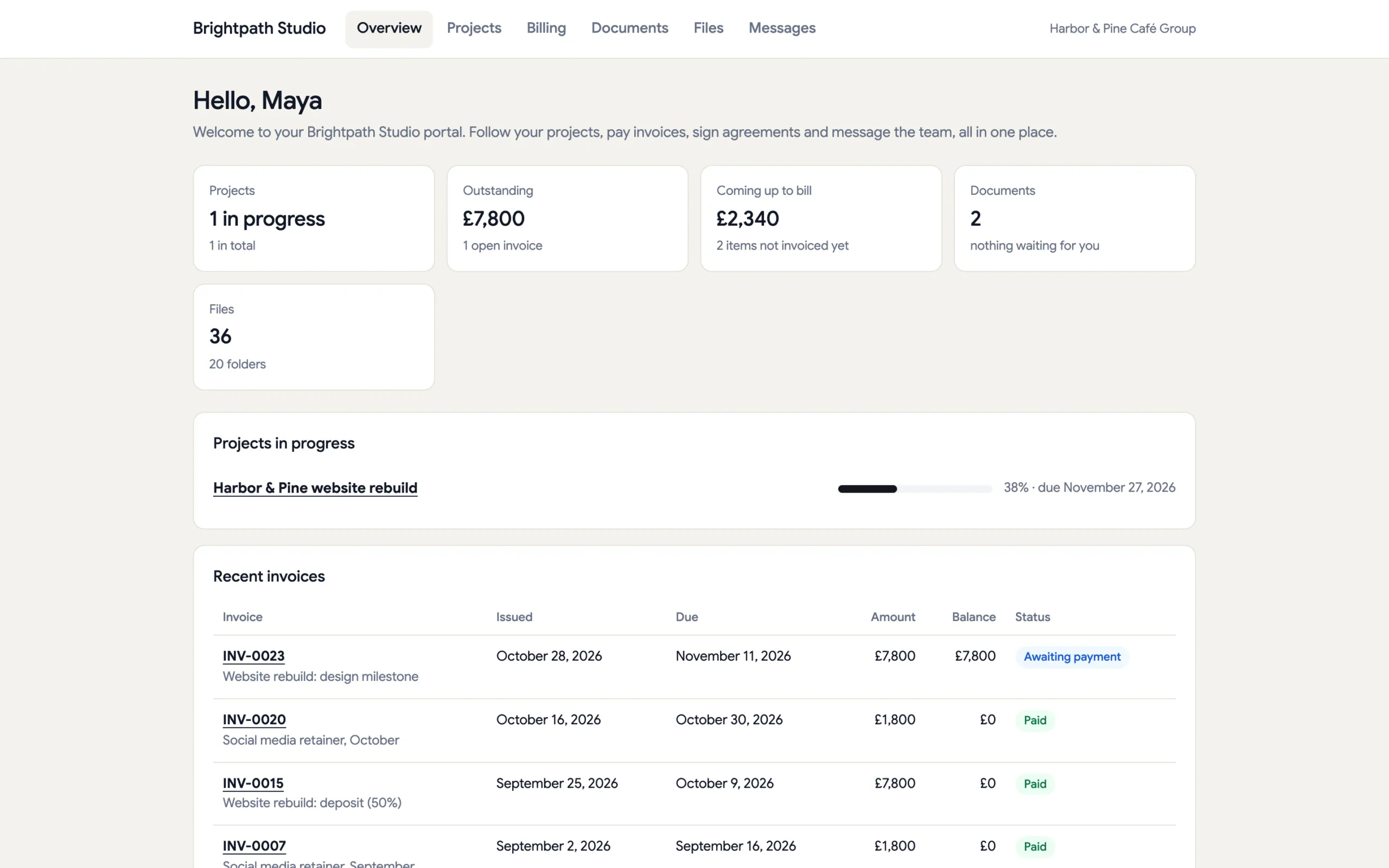
The client portal: The client portal as the client sees it, previewed from the app: invoices, projects, documents, files and messages for one organisation.

Conversations that stay with the client

Message a client from the app or the portal, optionally tied to a project or invoice, with attachments, open and closed threads and unread markers.
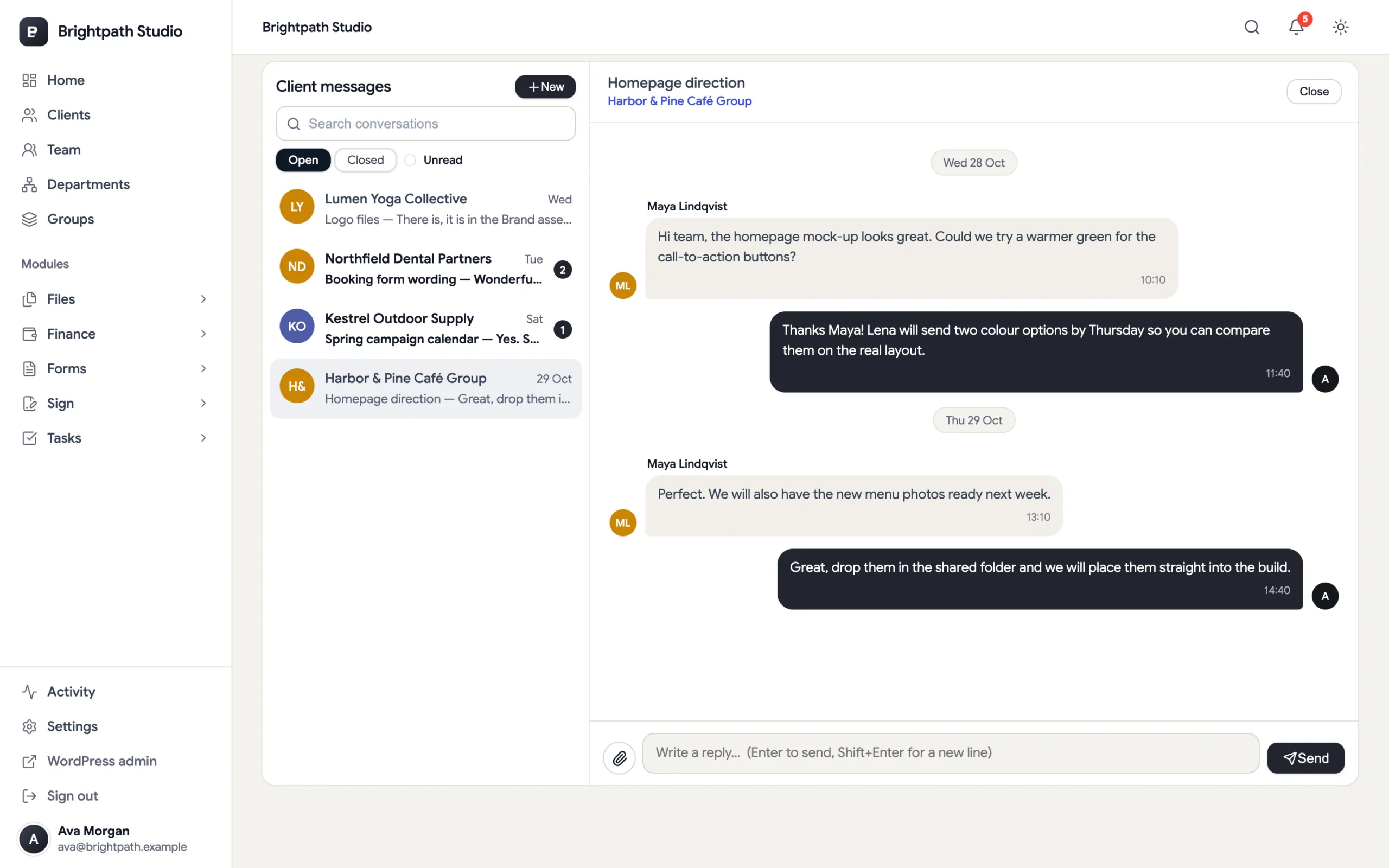
Client messages: Client messages: a conversation between a client and the team, with unread markers and the other open threads on the left.

Rename Clients to Customers, Students or Patients

Change Client, Team, Department and the module words in Settings, and the app, portal and emails all follow.
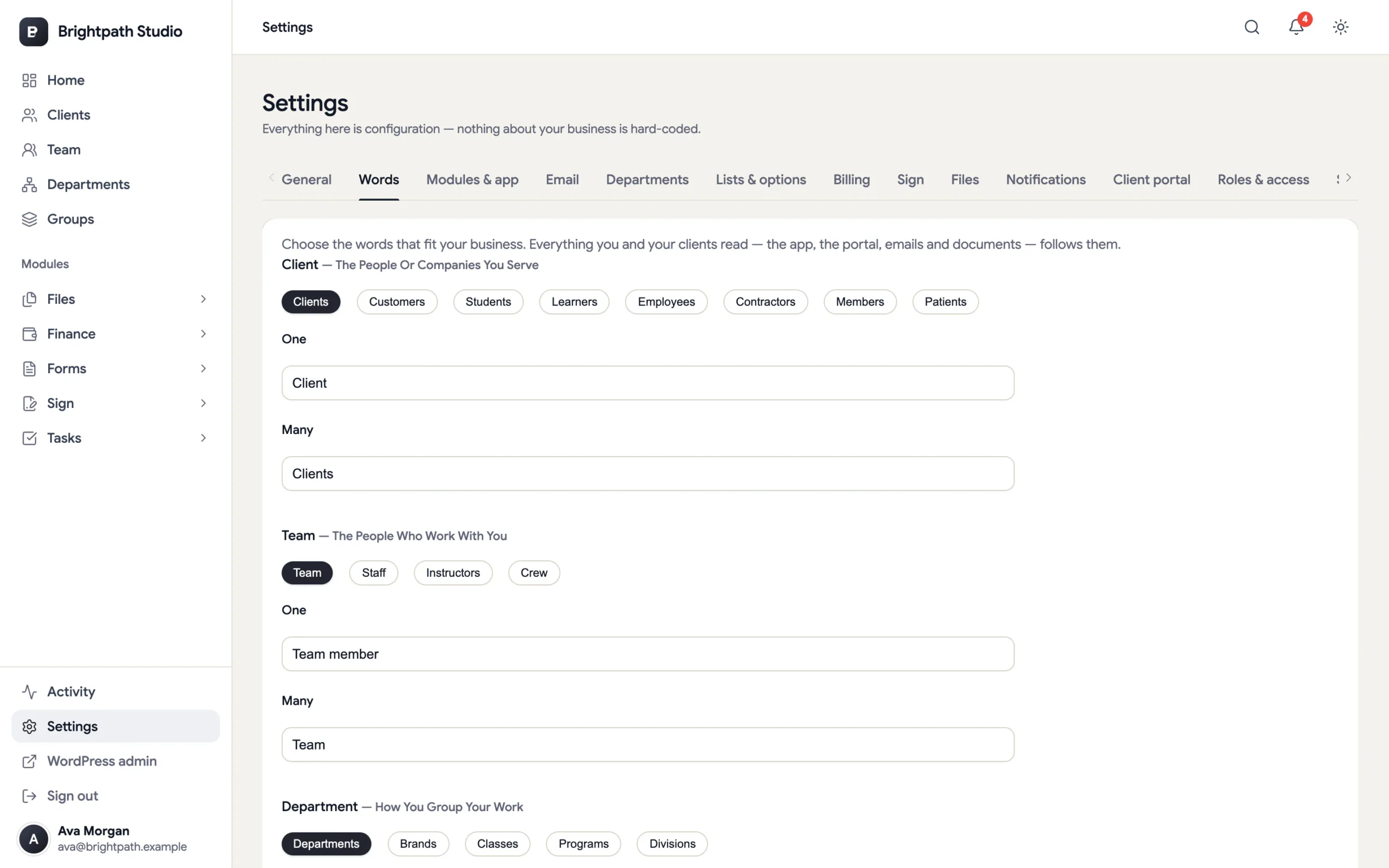
Settings: your words: Settings, Words: the studio can rename Client, Team, Project and other terms, and the app, portal and emails use the new words.

A backup before you try something new

Back up everything WPFlat holds on demand or on a schedule, optionally with files and a password, and restore all of it or only some parts.
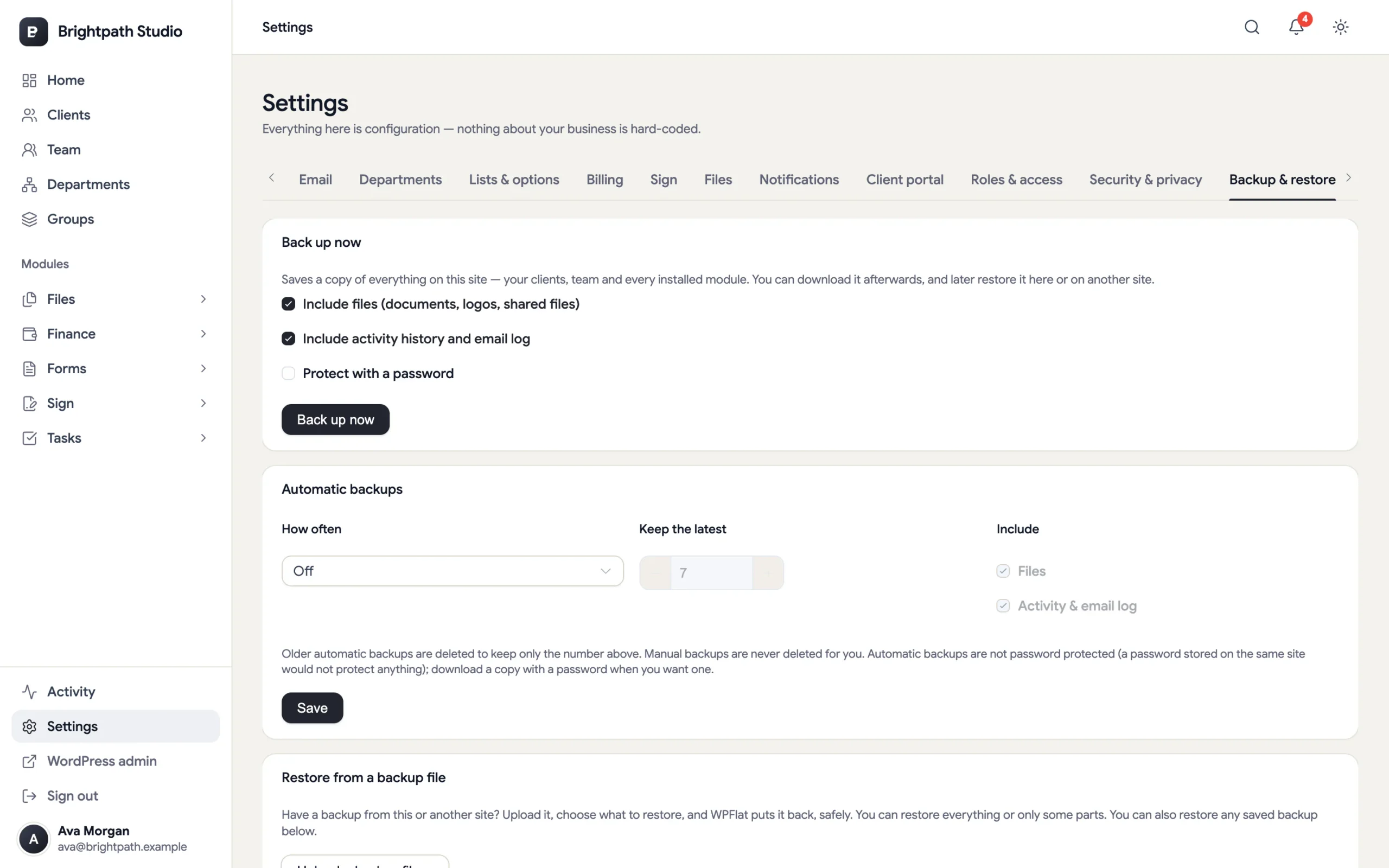
Settings: backup and restore: Settings, Backup and restore: take a backup of the suite's data on demand or on a schedule and restore from one.

The full feature list.

Clients, team and structure

  • Clients with contacts, a type, a status, address and notes
  • Several contacts per client, each with a role such as primary or billing
  • Team members (employees or contractors) with role, department and start date
  • Departments and client groups
  • A client profile that pulls in billing, tasks, documents, forms, files and messages
  • An activity log of what changed, by whom

The app

  • A full-screen app at yoursite.com/app/ with your own business name and colour
  • Branded sign-in and password reset
  • Installable on a phone as a web app
  • Search across clients, team and every module with Ctrl/Cmd K
  • A Home dashboard that each module adds cards to
  • Rename the words your people see

Portal and messages

  • A client portal at yoursite.com/portal/, showing only the client’s own records
  • Portal logins created for client contacts, and a preview as the client
  • Client messages with attachments, open and closed threads and unread markers
  • Notifications by bell and email, set per person to instant, daily digest or off

Settings and safety

  • One business profile shared by every module, invoice, contract and email
  • Roles and access, with a manager role per module
  • Backup and restore of all WPFlat data, on demand or scheduled, optionally encrypted
  • Stealth mode (optional): WordPress’s own entry points answer “Not Found” unless you hold the gate
  • Import from the older BizyDash plugin

What it does not do

  • On its own it has no invoices, projects, contracts, files or forms: those come from the modules.
  • One business per install. It is not a multi-tenant system.
  • Messages live in the app and portal and notify by email. It is not a shared email inbox.
  • Portal logins are WordPress user accounts (the plugin can create them for you).

Install it yourself, or let us do it.

Option 1 · Free

Download from GitHub and install it

No sign-up, no licence key and no limits. It runs on your own WordPress site.

  1. Download wpflatcore.zip from GitHub with the button below.
  2. In WordPress go to Plugins, Add New, Upload Plugin, choose the zip and activate it.
  3. Open the WPFlat app from the admin menu and follow the first-run steps to set your company, team and the words you use.
  4. Add the modules you need, one at a time.
Option 2 · Hosted by WPFlat

Let WPFlat install and configure it

Would rather not run it yourself? Tell us what your team needs and we will set it all up and look after it.

  • Installing WPFlat Core and WPFlat Core on your WordPress site, or on a site we host for you
  • Setting up your company, team, branding and the words you use
  • Bringing in your existing data where we can
  • A walkthrough for your team
  • Hosting, updates, backups and support, if you want them

Before you download.

Do I have to install every module?

No. Install Core and only the modules you want. Each module needs Core 0.6.0 or newer and no other module.

Can I rename “Clients”?

Yes. Settings, Words offers presets such as Customers, Students, Patients or Members, or your own words, and the app, portal and emails use them.

Can my clients log in?

Yes. Core includes a portal where each client contact signs in and sees only their own organisation’s pages from the modules you have installed.

Can I take a backup before trying something?

Yes. Settings, Backup and restore creates a backup now or on a schedule, and a backup can be restored later, in full or in part.

Will it work on a phone?

Yes. The app is responsive and can be installed on the home screen as a web app.

Where is my data stored?

In your own WordPress database and uploads folder. WPFlat Core has no licence check and does not send your data to WPFlat.

Can WPFlat set up WPFlat Core for me?

Yes. We can install it, configure it for your team, bring in your data, host it and look after it. Ask on the contact page and tell us what you need.

Is WPFlat Core really free?

Yes. It is open source under the GPL, with no paid tier, licence key or user limit. You pay only for your own WordPress hosting and domain, or for our help if you ask for it.

Start with Core, add the rest later.

Download WPFlat Core, upload it to your WordPress site and set up your company in a few minutes.