


New

The WPforOps Manifesto. Why WordPress can run more of your organisation than you think.

Read it
  1. Home
  2. Plugins
  3. WPFlat Forms
Free and open source · by WPFlat

WPFlat Forms: online forms your clients fill in, on WordPress.

Collect what you need from clients with forms that save as they type, come with a private link to finish later, and repeat their sections for each company or branch. A free, open-source module for WPFlat Core.

Version 0.4.3 · GPL-2.0-or-later · WordPress 6.0+ · PHP 7.4+ · needs WPFlat Core 0.6.0+

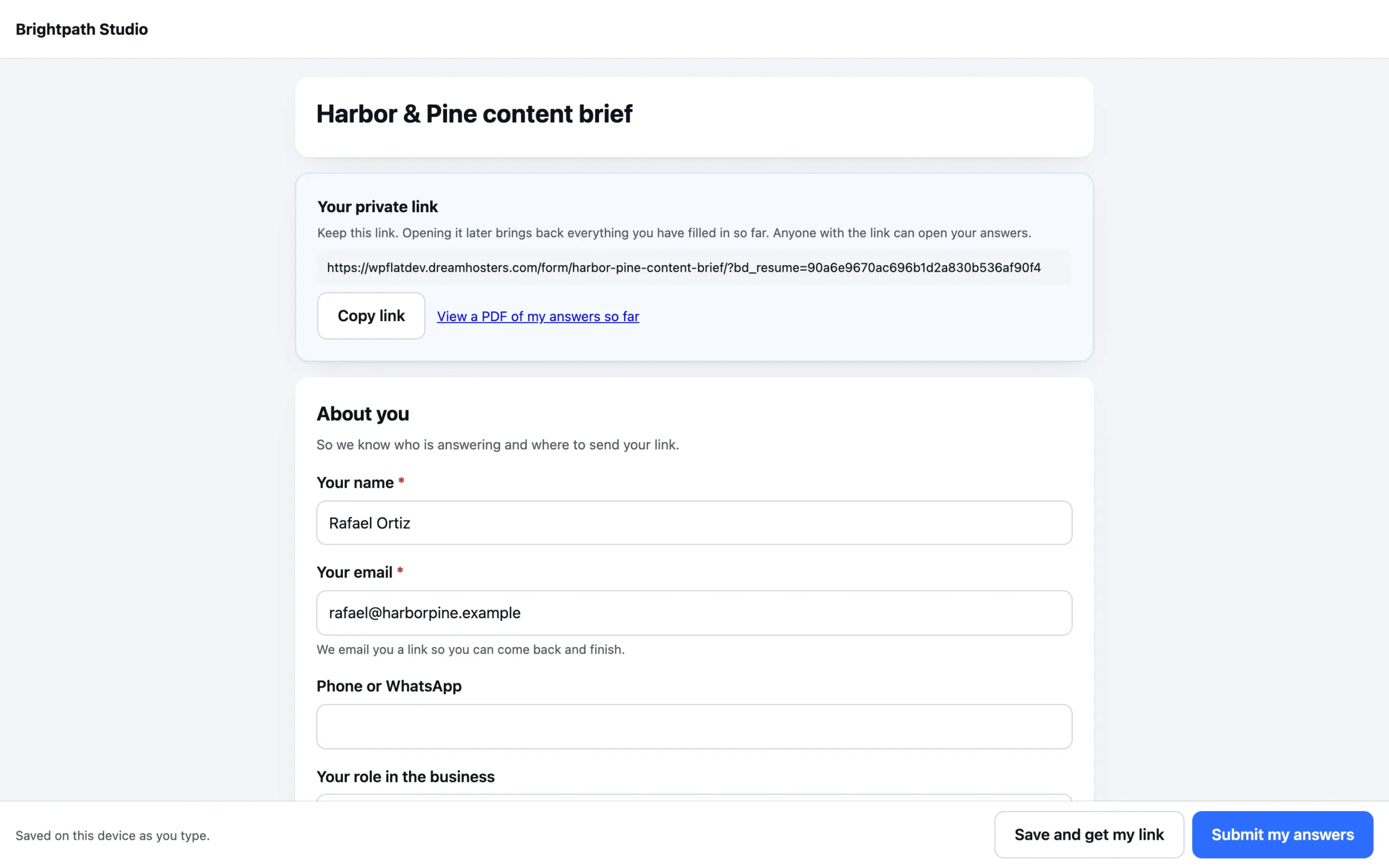
The form being filled in: A client coming back to a saved draft through their private link: sections for the business and for each company, with answers already filled in.

WPFlat Forms needs WPFlat Core.

WPFlat Forms is a module for WPFlat Core, the free, open-source plugin that holds your clients, team, client portal and settings. Install WPFlat Core first, then WPFlat Forms. Core is what gives WPFlat Forms its people, its login and its look; the module adds the forms.

Forms clients can actually finish.

Answers save as they type

Clients get a private link by email to come back and finish, and a submitted form can still be edited through it.

Sections that repeat per company

Ask the company questions once for the parent company and once for each subsidiary or branch.

Every answer in the app

See every answer, including forms still in progress, copy as text, download Markdown or export CSV.

A brief clients will actually finish.

Say what it is for, and get consent first

The client opens a public page that explains who the form is from, what is asked and how the answers are used, and ticks a consent box before the questions.
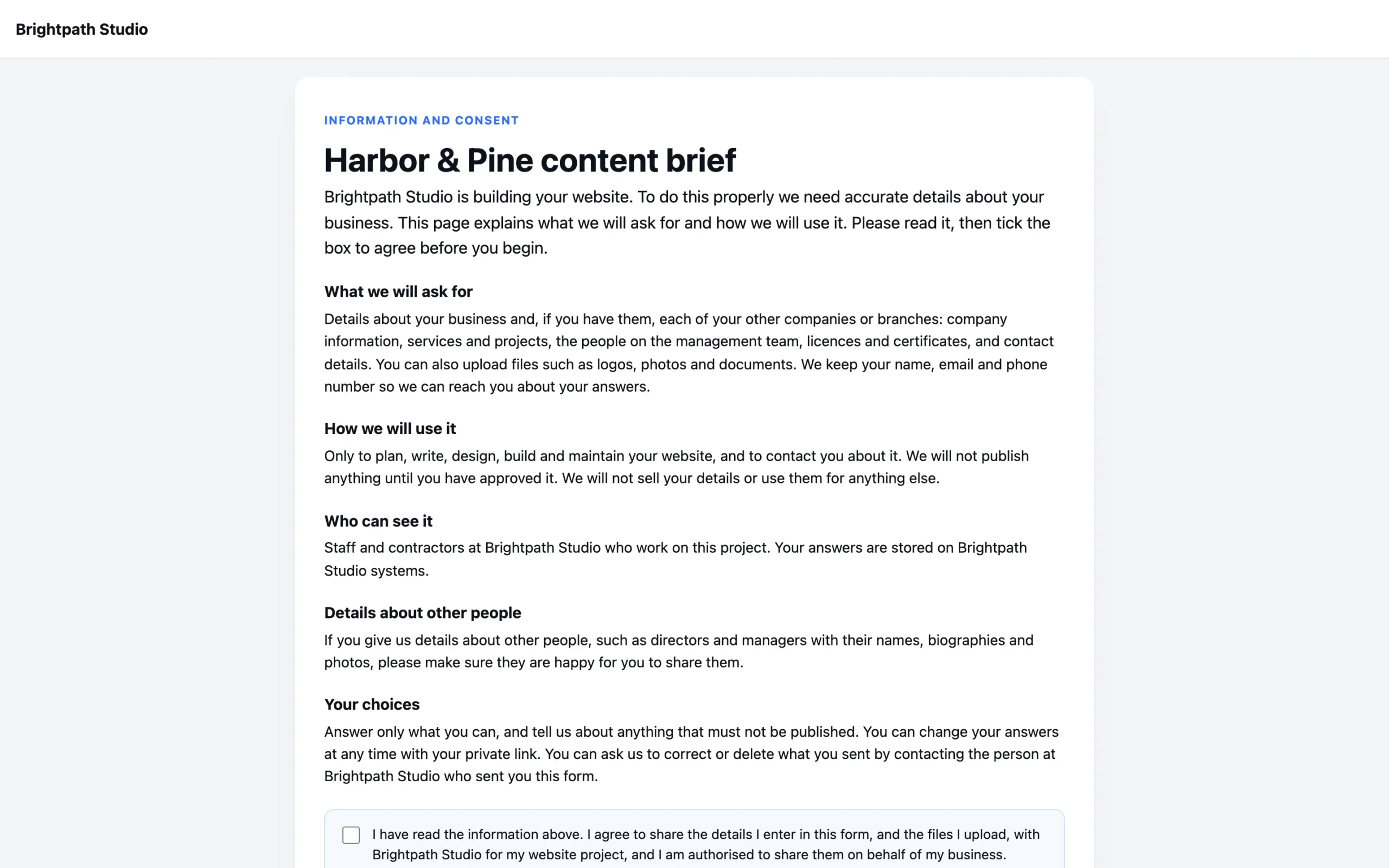
The brief the client opens: The public page a client opens from the form link: who it is from, what it is for, how saving works, and a consent tick box before the questions.

Every answer, including forms in progress

See who answered, when, how many companies, and whether the form is submitted or still in progress. Open or close a form and choose who is emailed on submit.
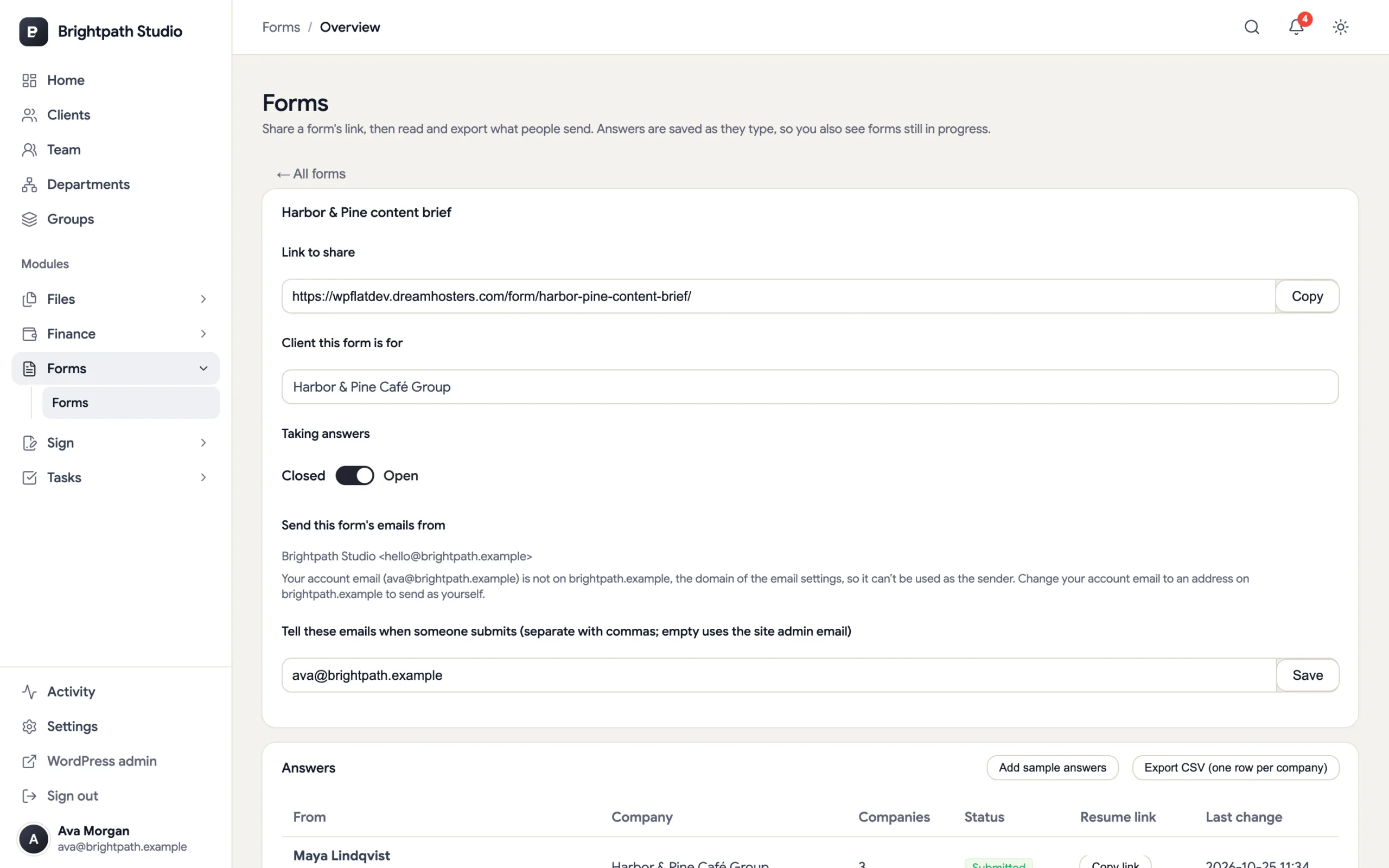
Answers received: The answers list for one form: who answered, when, how many companies, and whether the answer is submitted or still in progress.

Read it, copy it, export it

Read a submitted brief in the app, with the answers for the parent company and each branch. Copy as text, download Markdown or PDF, or export CSV with one row per company.
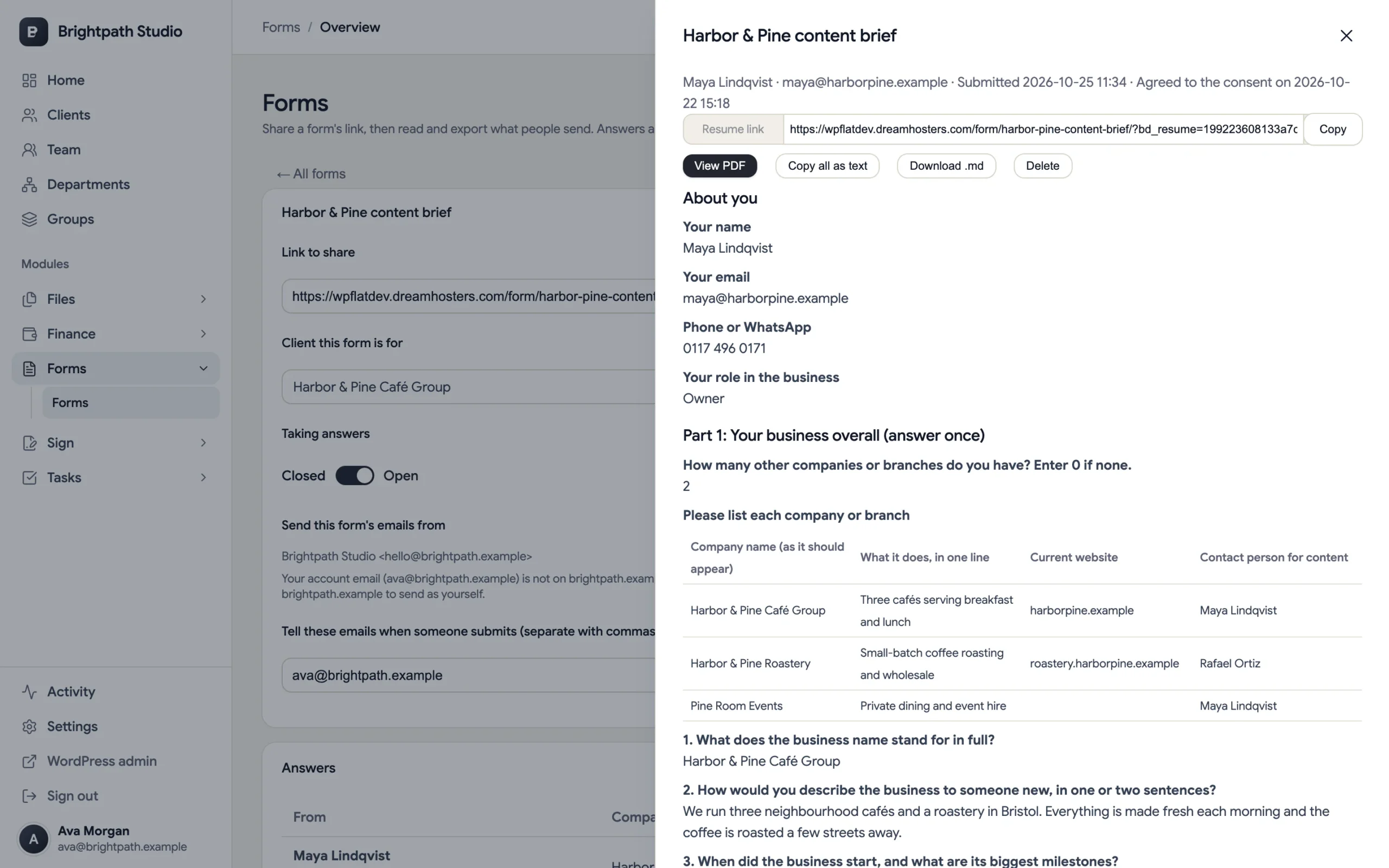
One set of answers: A single submitted brief read in the app, with the answers for the parent company and each branch, plus copy-as-text, Markdown and PDF options.

Forms attached to the client

Attach a form to a client and the client’s profile shows a Forms tab with its answers.
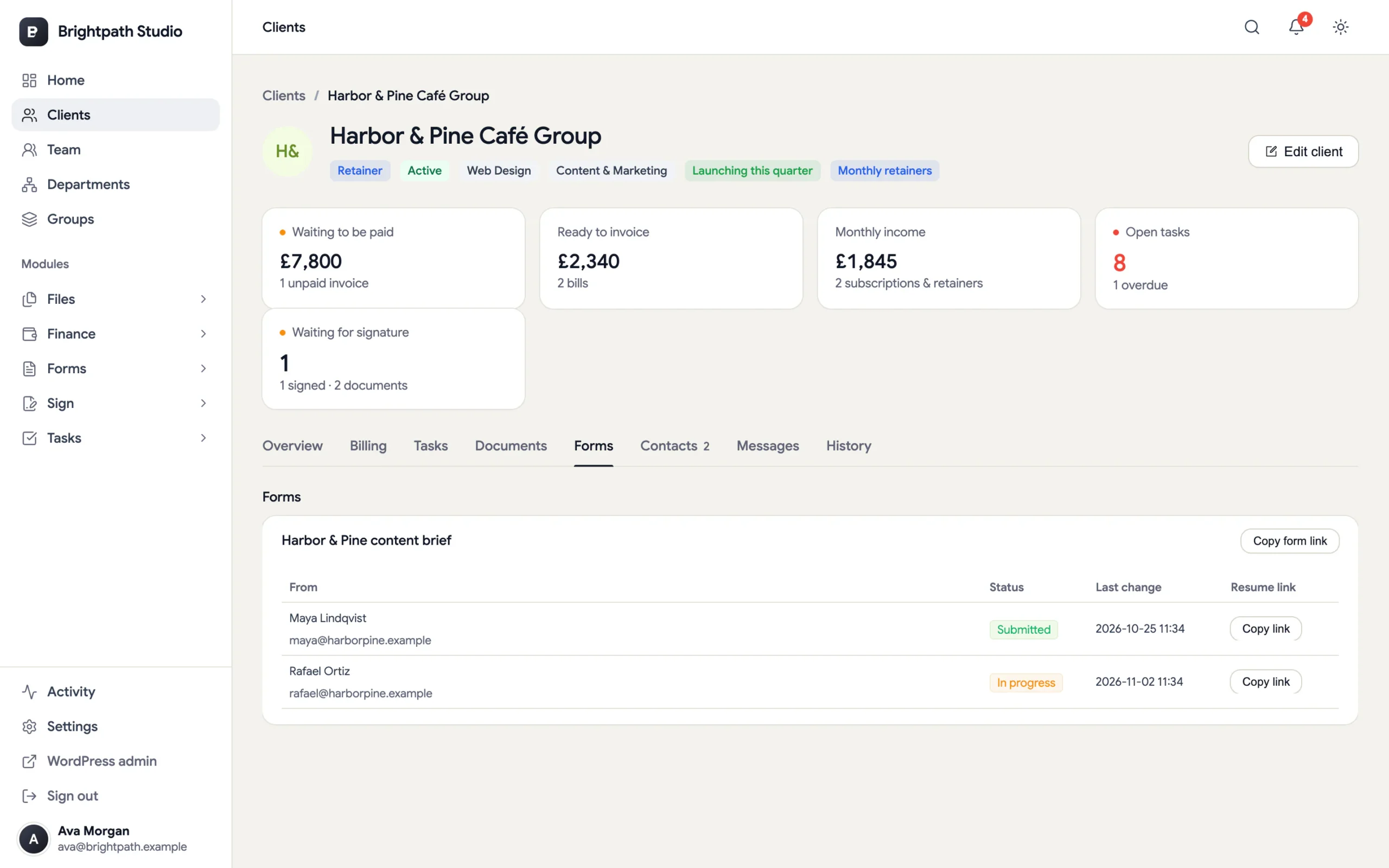
Forms on a client page: A client's profile with its Forms tab, showing the forms attached to that client and their answers.

The full feature list.

What a client sees

  • A public page at yoursite.com/form/<address>/, no login needed
  • A cover page with a consent tick box, recorded with the version of the wording
  • Sections that repeat for each company or branch
  • Answers that save as they type, with an emailed private link to come back
  • A file drop zone per company, up to 50 MB each

What your team sees

  • A Forms screen with each form’s link, client, submitted and in-progress counts
  • Open or close a form, and choose who is emailed on submit
  • Every answer, with each person’s private resume link for admins
  • Copy as text, download Markdown or PDF, or export CSV (one row per company)
  • A Forms tab on the client’s profile

Building forms

  • Forms are JSON files in templates/, so they can live in version control
  • Add your own folder with the wpflatforms_template_dirs filter
  • Field types: text, long text, email, phone, URL, number, drop-down, radio, checkboxes, headings and notes
  • A count of companies and a table of companies for repeating groups
  • {site} in any text becomes your site name

Protection

  • A hidden spam-trap field and rate limits on saving, uploading and submitting
  • Uploads are private and open only to signed-in team members with access
  • Emails use the branded look from WPFlat Core

What it does not do

  • No drag-and-drop form builder yet. New forms are JSON files, and only one generic form ships.
  • No payment fields, e-signatures or conditional logic. The only branching is the repeated company sections.
  • Spam protection is a hidden field and rate limits, not a CAPTCHA.
  • Answers are read in the app and exported. There is no automatic push into other systems.

Install it yourself, or let us do it.

Option 1 · Free

Download from GitHub and install it

No sign-up, no licence key and no limits. It runs on your own WordPress site.

  1. Install and activate WPFlat Core first (download).
  2. Download wpflatforms.zip from GitHub with the button below.
  3. In WordPress go to Plugins, Add New, Upload Plugin, choose the zip and activate it.
  4. Open WPFlat Forms in the WPFlat app and follow the first-run steps.
Option 2 · Hosted by WPFlat

Let WPFlat install and configure it

Would rather not run it yourself? Tell us what your team needs and we will set it all up and look after it.

  • Installing WPFlat Core and WPFlat Forms on your WordPress site, or on a site we host for you
  • Setting up your company, team, branding and the words you use
  • Bringing in your existing data where we can
  • A walkthrough for your team
  • Hosting, updates, backups and support, if you want them

Before you download.

Can the client leave and come back?

Yes. Answers save as they type, and the client gets a private link by email to continue. They can still edit after submitting.

Can clients upload files?

Yes, per company, up to 50 MB each. Only your team can open them.

Can I add my own questions?

Yes, by adding a JSON form definition. See templates/website-content-brief.json in the repository as an example. There is no visual editor yet.

Who can see the answers?

Signed-in team members with Forms access. Answers are never public.

Can WPFlat set up WPFlat Forms for me?

Yes. We can install it, configure it for your team, bring in your data, host it and look after it. Ask on the contact page and tell us what you need.

Is WPFlat Forms really free?

Yes. It is open source under the GPL, with no paid tier, licence key or user limit. You pay only for your own WordPress hosting and domain, or for our help if you ask for it.

Collect what you need, once.

Download WPFlat Forms, add it next to WPFlat Core and send your first form.