



New

The WPforOps Manifesto. Why WordPress can run more of your organisation than you think.

Read it
  1. Home
  2. Plugins
  3. WPFlat Sign
Free and open source · by WPFlat

WPFlat Sign: contracts and e-signatures inside WordPress.

Send contracts and agreements to be signed online, keep sealed PDFs and a full record of who did what, and let anyone check a document on a verification page. A free, open-source module for WPFlat Core.

Version 0.4.1 · GPL-2.0-or-later · WordPress 6.0+ · PHP 7.4+ · needs WPFlat Core 0.6.0+

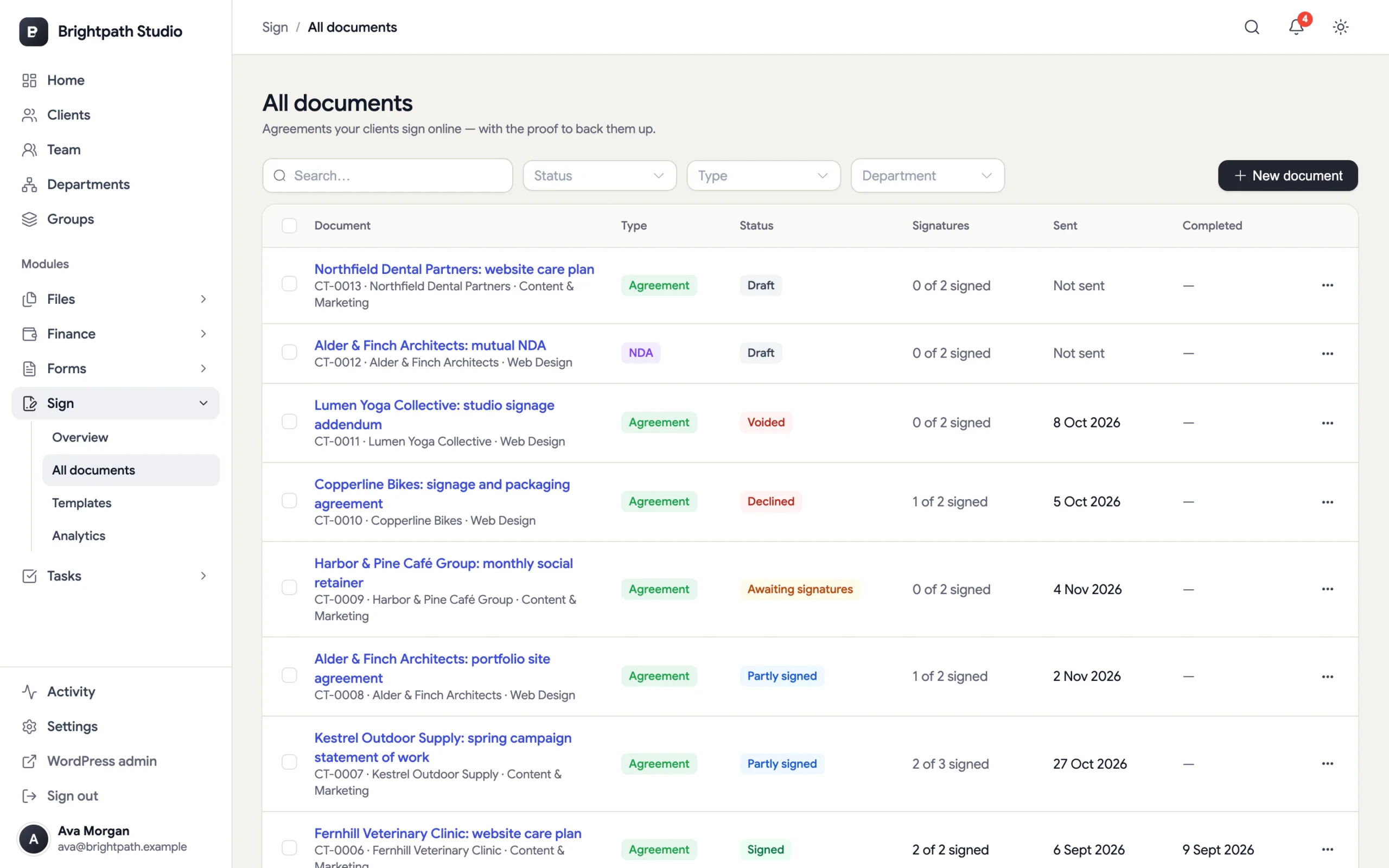
All documents: Every agreement with its number, client, status (signed, awaiting signatures, declined, void, draft) and who has signed so far.

WPFlat Sign needs WPFlat Core.

WPFlat Sign is a module for WPFlat Core, the free, open-source plugin that holds your clients, team, client portal and settings. Install WPFlat Core first, then WPFlat Sign. Core is what gives WPFlat Sign its people, its login and its look; the module adds the contracts and e-signatures.

Get contracts signed without leaving your site.

E-signature online

Send a contract, and the signer signs it in the browser, no account needed with another service.

Sealed PDFs and an audit trail

Each signed document is sealed as a PDF, with a full record of who did what and when.

A verification page

Anyone holding a signed document can check it on a verification page on your own site.

Contracts from draft to signed.

Sign in the browser, no account needed

The signer opens a personal link, reads the agreement, ticks a consent box, draws or types a signature and confirms with an emailed code.
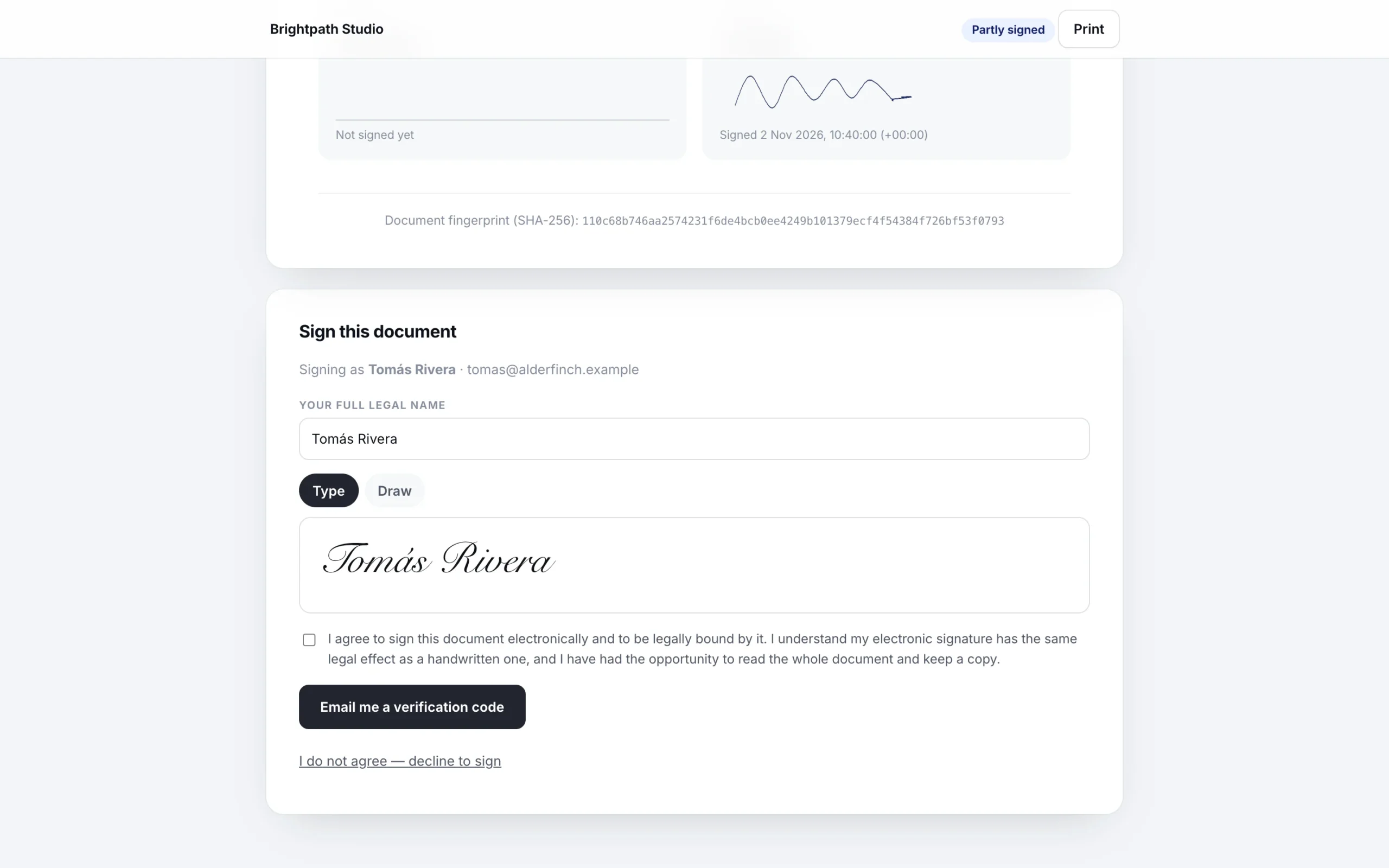
The page the client signs on: What the client sees when they open their personal signing link: the agreement text, a consent tick box and a place to draw or type a signature, confirmed by an emailed code.

Locked text, fingerprint and every signer

Once sent, the text is locked and its SHA-256 fingerprint recorded. A signed agreement shows each signer with dates and buttons for the signed PDF and certificate.
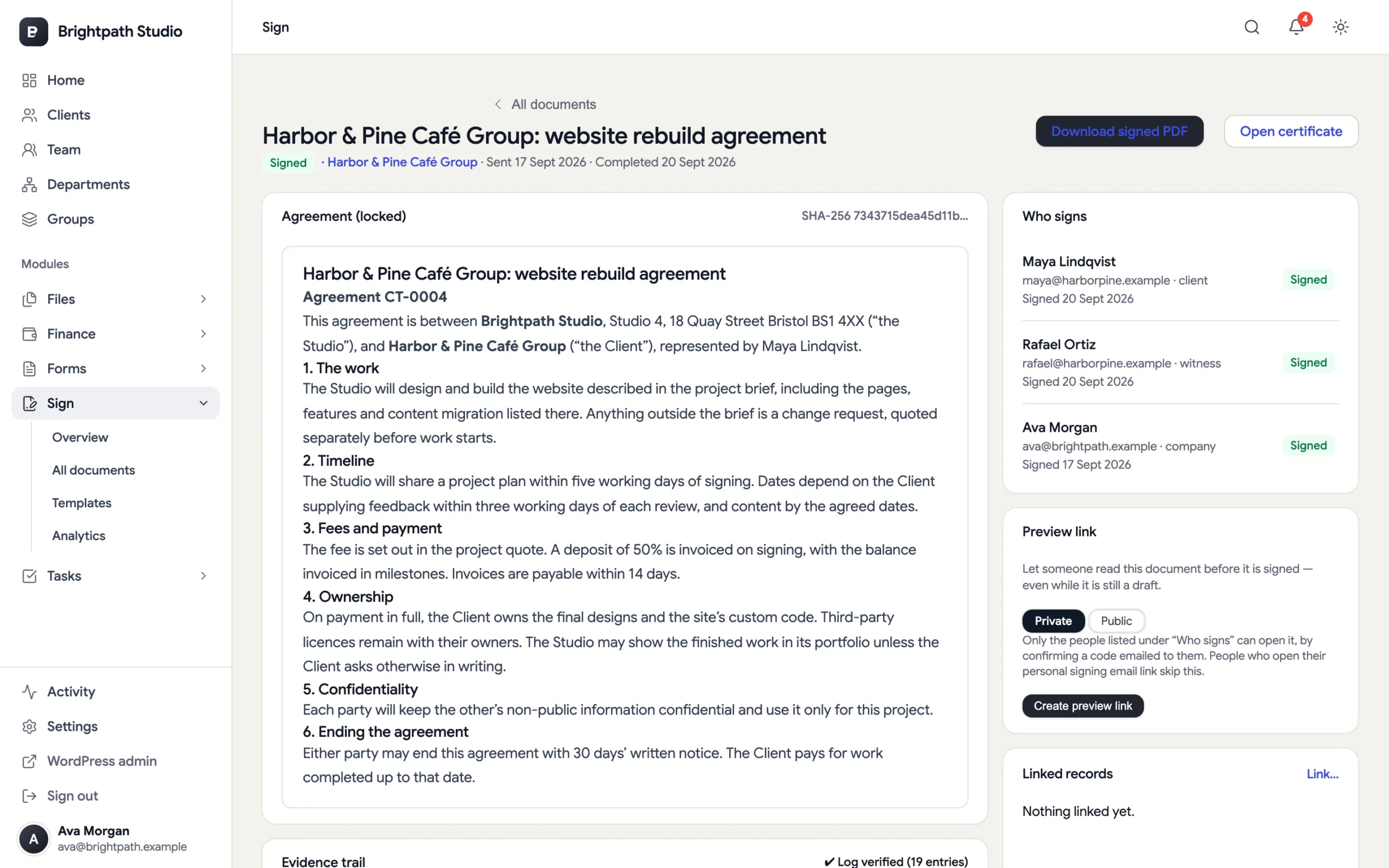
A signed agreement: A fully signed agreement: the locked text with its SHA-256 fingerprint, the three signers with dates and the signed-PDF and certificate buttons.

A log that proves who did what

Every event from creation to the sealed PDF is chained to the one before, and the screen shows whether the log still verifies.
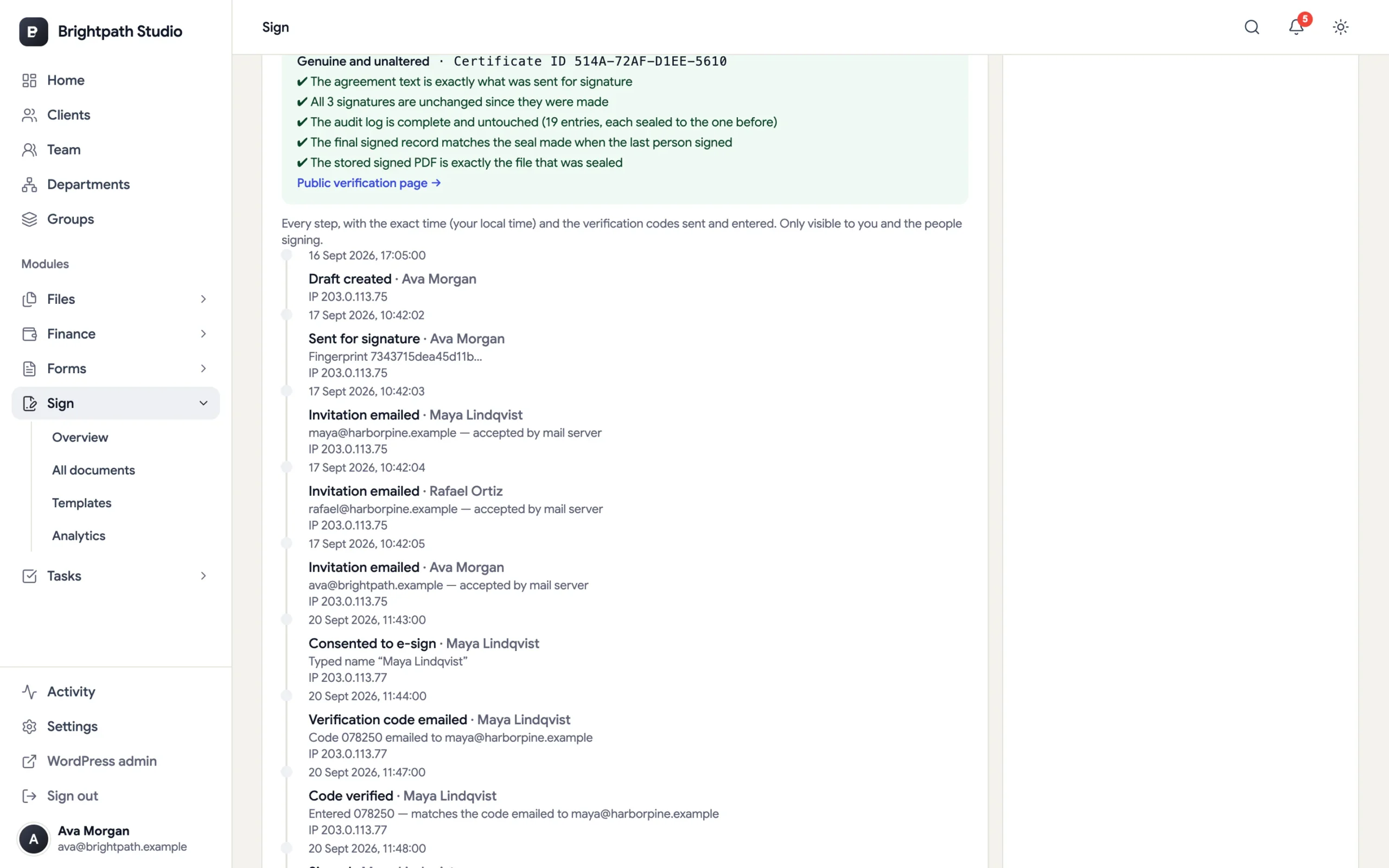
Evidence trail: The evidence trail under a signed agreement: a hash-chained audit log of every event from creation to the sealed PDF, verified entry by entry.

A certificate of completion

Who signed, when, from where, and the fingerprints that show the document was not changed. Anyone can check it on a public verification page.
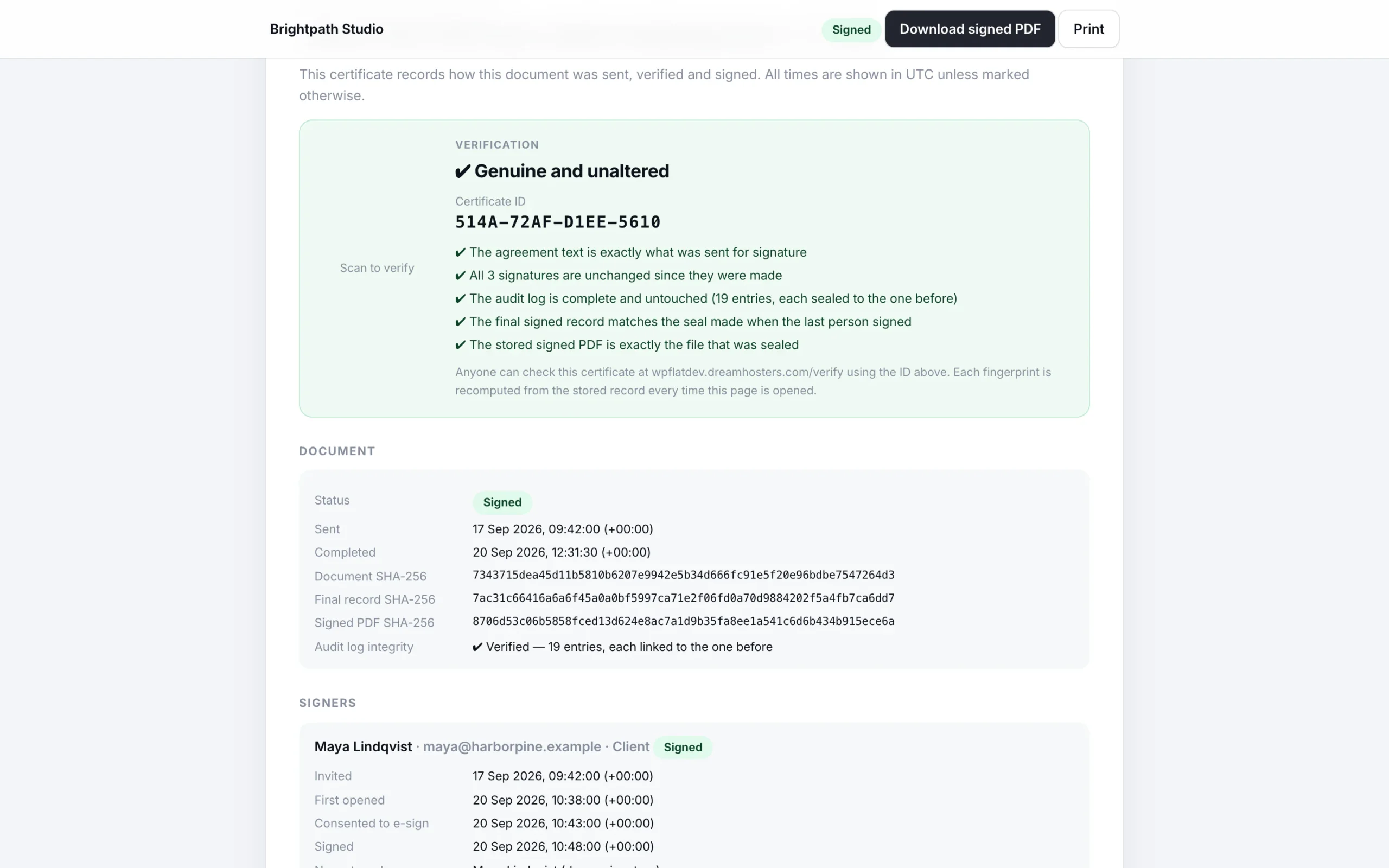
Certificate of completion: The certificate of completion for a signed agreement: who signed, when, from where, and the fingerprints that prove the document was not changed.

Know where signing stalls

Sent versus signed, completion rate, time to sign and where signers drop off.
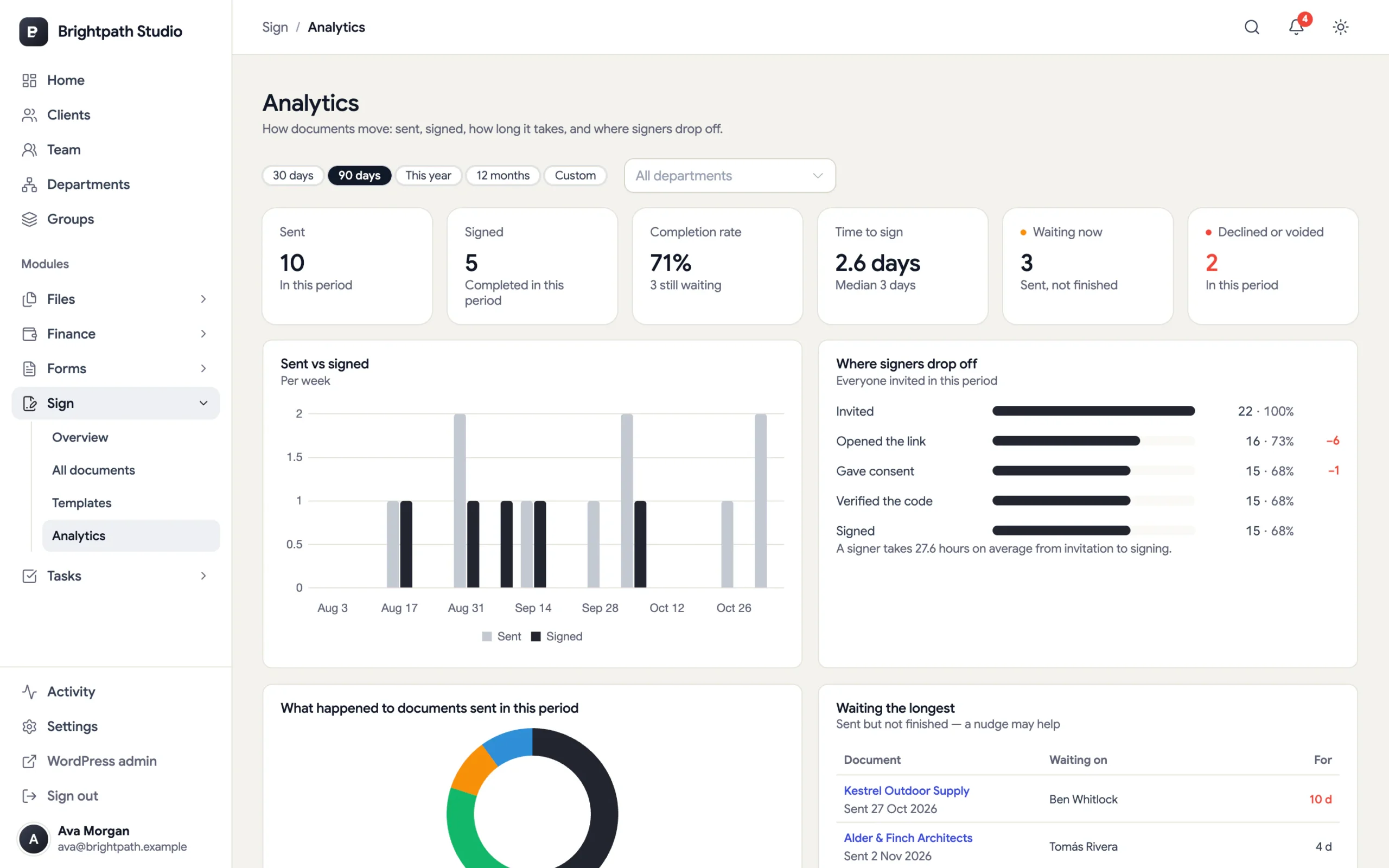
Signing analytics: Analytics for the last 90 days: sent versus signed, completion rate, time to sign and where signers drop off.

The full feature list.

Preparing documents

  • Templates with merge fields such as client, contact, company, date and document number
  • Documents with a number, client, department and optional expiry
  • Import a Word file (.docx or .doc) or a Google Docs link
  • Signers with a role (client, company or witness)
  • A private or public read-only preview link

Signing

  • A personal signing link for each signer
  • Explicit consent, then a drawn or typed signature
  • An emailed one-time code to confirm identity
  • Reminders, voiding with a reason, and declining with a reason
  • Several signers, in any order

Evidence and proof

  • A hash-chained audit log with a “Log verified” check
  • A sealed PDF with every signature and a Certificate of Completion
  • A public verification page where anyone can check a document
  • Signed documents are re-verified after a restore from backup

Fits with the rest of WPFlat

  • A Documents page in the client portal with contracts to sign and signed copies
  • Notifications when a document is waiting, signed or declined
  • Optional links to records from other modules, such as an invoice

What it does not do

  • It does not give legal advice or claim a particular legal standard for e-signatures. Check that they are acceptable for your documents and country.
  • You cannot place signature boxes on the pages of an uploaded PDF.
  • Identity is confirmed by an emailed code only. There are no ID checks or SMS codes.
  • Once sent, the text is frozen. Void the document and create a new one to change it.
  • On the certificate page, the “Scan to verify” QR area did not render in our headless test. The verification link still works.

Install it yourself, or let us do it.

Option 1 · Free

Download from GitHub and install it

No sign-up, no licence key and no limits. It runs on your own WordPress site.

  1. Install and activate WPFlat Core first (download).
  2. Download wpflatsign.zip from GitHub with the button below.
  3. In WordPress go to Plugins, Add New, Upload Plugin, choose the zip and activate it.
  4. Open WPFlat Sign in the WPFlat app and follow the first-run steps.
Option 2 · Hosted by WPFlat

Let WPFlat install and configure it

Would rather not run it yourself? Tell us what your team needs and we will set it all up and look after it.

  • Installing WPFlat Core and WPFlat Sign on your WordPress site, or on a site we host for you
  • Setting up your company, team, branding and the words you use
  • Bringing in your existing data where we can
  • A walkthrough for your team
  • Hosting, updates, backups and support, if you want them

Before you download.

Can a signer sign without an account?

Yes. They use their personal link and an emailed code. No WordPress login is needed.

What stops someone changing a signed agreement?

The text is fingerprinted when sent, every event is chained to the previous one, and the final PDF’s fingerprint is stored in that chain. The integrity check shows if any part no longer matches.

Can I use my own Word contracts?

Yes. Import a .docx or .doc file or a Google Docs link, check the result, then send it.

Is an e-signature legally binding?

That depends on your country and the type of document. WPFlat Sign records who signed, when and what, but it is software, not legal advice.

Can WPFlat set up WPFlat Sign for me?

Yes. We can install it, configure it for your team, bring in your data, host it and look after it. Ask on the contact page and tell us what you need.

Is WPFlat Sign really free?

Yes. It is open source under the GPL, with no paid tier, licence key or user limit. You pay only for your own WordPress hosting and domain, or for our help if you ask for it.

Get your next contract signed online.

Download WPFlat Sign, add it next to WPFlat Core and send your first contract.